
AV Support for Corporate Summits: A Practical Guide
What if the biggest AV risk at a corporate summit isn’t a failed microphone, but audio, video, lighting, and stage cues working from different plans? Keynotes, panels, walk-ons, and transitions each place different demands on the room, and a technical issue at the wrong moment can interrupt the program. AV support for corporate summits is most effective when every production element works as part of one coordinated system.
Turning an agenda into clear production requirements can feel complicated, especially when several speakers and program formats share the stage. Start by identifying what attendees need to hear and see in each session, then connect those needs to the equipment, crew, and cues required.
This guide explains how summit AV components work together, what information to prepare, and how integrated technical support can help reduce preventable disruptions. You’ll learn how audio, video, lighting, staging, and rigging contribute to the attendee experience, and how to align production decisions with your summit’s goals. Ambassador Event Production brings these technical disciplines together, working behind the scenes so your speakers and program can take center stage.
Key Takeaways
- Align audio, video, lighting, and staging around one shared run of show to keep program transitions coordinated.
- Match technical requirements to each format: keynotes, panels, and breakouts call for different audience and interaction needs.
- Prepare the agenda, speaker details, presentation materials, and cue information to give the production team a clear starting point.
- AV support for corporate summits works best when technical disciplines and execution are coordinated as one production plan.
- A focused technical rehearsal gives the team time to walk through cues and address issues before the program begins.
AV Support for Corporate Summits: Coordination Matters
A corporate summit can bring executives, clients, and teams together around a high-stakes program. Keynotes and panels depend on more than equipment being present: presenters need to be heard and seen, content must reach the audience, and transitions should support the flow of the agenda. Integrated summit AV support is coordinated technical production that connects the program, production cues, and audience experience.
In practice, AV support for corporate summits brings audio, video, lighting, staging, and rigging into a shared production plan. The broad term Audiovisual technology covers the combination of sound and visual elements. Summit production applies those elements to a live program, where they need to work together in the room.
Technical production is distinct from event planning, venue management, and catering. Organizers shape the summit and its schedule; the venue manages its spaces and operations; catering serves attendees. Technical production focuses on how speakers, presentations, lighting, and stage elements are delivered during the program. Clear roles let the production team concentrate on technical execution while working from the organizer’s agenda.
Which technical disciplines shape the summit experience?
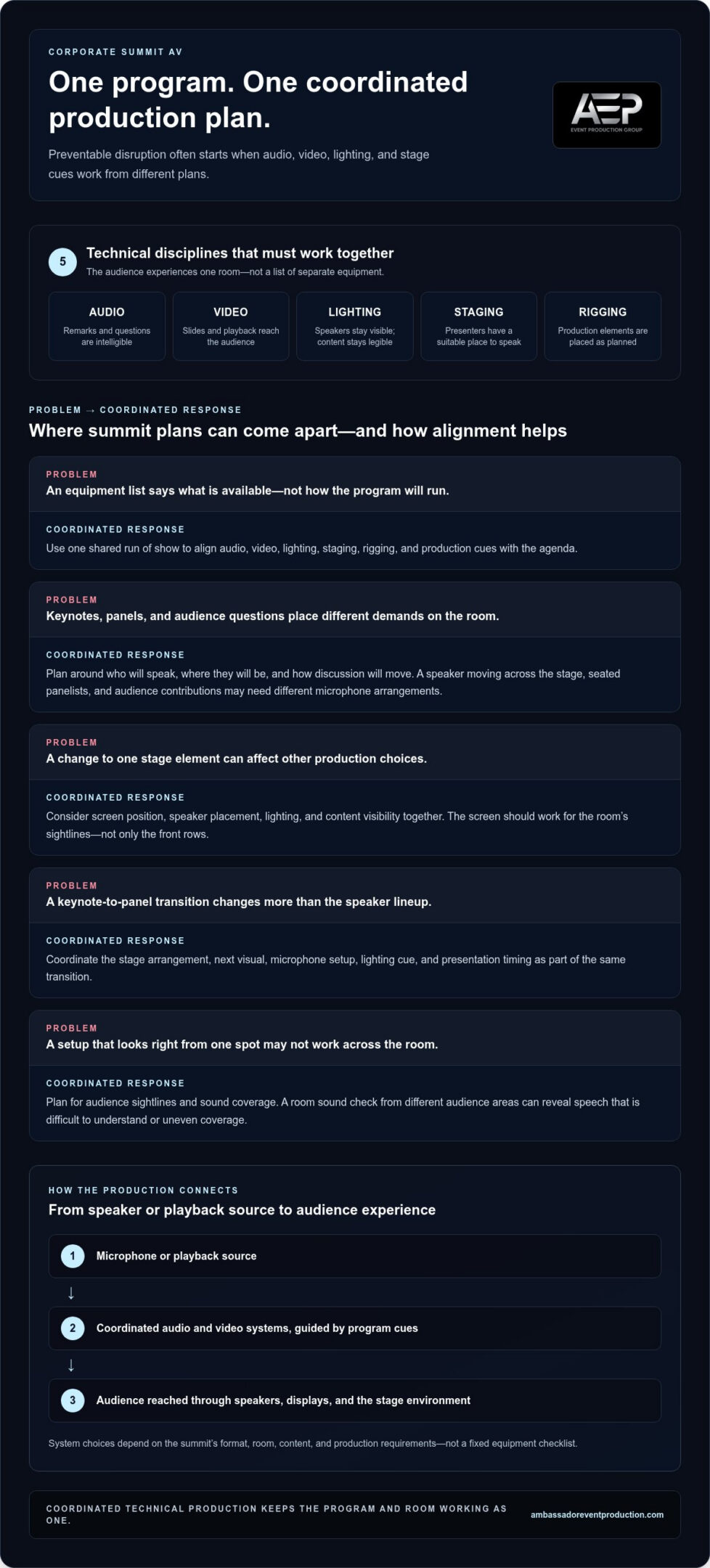
Audio support helps make keynote remarks, panel discussions, and audience questions intelligible throughout the room. Video support brings presentations and playback into view, with screen placement and audience sightlines considered together. Lighting helps keep speakers visible and supports the tone of each segment. Staging gives presenters and panelists a defined place to speak, while rigging supports the planned placement of production elements overhead or around the stage.
These disciplines affect one another. A screen position influences where speakers can stand; lighting needs to illuminate people without undermining the visibility of displayed content. The aim is a room that feels coherent to the audience, not a collection of separate technical features.
Why does coordination matter more than an equipment list?
An equipment list describes what is available, but it doesn’t explain how production will support the program. A late change to a panel format, for example, can affect microphone needs, stage arrangement, lighting cues, and presentation timing. Coordinating those details helps the team respond to the agenda as a whole instead of treating each change as an isolated request.
Room layout matters, too. A screen that works for the front rows may be difficult to see from the back or sides, and a stage arrangement that suits a keynote may not suit a group discussion. Planning technical decisions around the room, content, and audience keeps visibility and intelligibility central.
So the core question isn’t simply how much equipment a summit needs. It’s whether the production plan supports each part of the program, and whether the people responsible for audio, video, lighting, staging, and rigging are aligned. Coordination is the behind-the-scenes work that helps speakers remain the focus.
How Corporate Summit AV Connects Audio, Video, Lighting, and Staging
A summit’s technical production follows a chain: a speaker’s microphone or a playback source feeds into the audio and video systems, then reaches the audience through speakers, displays, and the stage environment. At the same time, cues guide when microphones are live, content appears, and lighting shifts between program moments. Each step depends on clear requirements and coordination across the team.
Summit AV works best when every signal and stage cue is designed around the same program and audience experience. System choices depend on the summit’s format, room, content, and production requirements, not on a fixed equipment checklist. A program with keynote presentations and panel discussions, for example, may need different microphone arrangements and screen content at different points.
How does summit audio support clear communication?
Microphone selection and placement shape how clearly presenters can be heard. A keynote speaker moving around the stage has different needs from panelists seated together, while audience questions require a way to bring each contribution into the room. Production planning accounts for who will speak, where they’ll be, and how discussion will move.
A room sound check lets the team listen from different audience areas and catch issues such as speech that is difficult to understand or uneven coverage. It also gives speakers and moderators a chance to get comfortable with microphones before the session. Detailed mixing techniques belong in a dedicated event audio guide. For summit planning, the priority is to connect the speaking format to practical sound checks and clear handoffs.
How do video, lighting, and staging support the program?
Presentation slides and playback need to be visible from the audience, so screen placement, content, and sightlines should be considered together. Lighting helps speakers remain visible while keeping the stage legible, and staging gives each segment a suitable setting. For more detail on shaping the stage around production needs, explore this custom stage design guide.
These decisions become especially clear during transitions. If a panel follows a keynote, the stage may need to shift from a single presenter to several speakers, while the next visual, microphone setup, and lighting cue are prepared. A shared run of show gives the production team a common sequence to follow: what happens, when it happens, and which cues support the change.
- Source: Identify whether the moment uses a live speaker, presentation, or playback.
- Audience: Consider how people in different parts of the room will hear and see it.
- Cue: Note the content, microphone, lighting, and stage changes needed for each transition.
Published summit programs, such as this technology summit program, show how summits bring multiple speakers and program elements together. For your own event, translating each moment into production cues helps the technical team prepare a coordinated delivery. Ambassador Event Production brings audio, video, lighting, staging, and rigging together as technical production support. Learn more about integrated event production support.
Choosing Summit AV for Keynotes, Panels, and Breakouts
The right production approach depends on what each session asks the audience to see, hear, and do. A keynote may center on one presenter and supporting visuals, while a panel relies on conversation among several speakers. Breakouts can vary by room size, content, and audience participation. For AV support for corporate summits, map technical needs to each session format instead of applying one equipment plan across the entire agenda.
Use this comparison as a starting point. The final setup should reflect the room, planned content, and way speakers and attendees will interact.
| Format | Typical focus | Technical considerations |
|---|---|---|
| Keynote | One primary speaker, often with presentation content | Speaker audibility, clear screen views, and smooth transitions between remarks and slides |
| Panel | Several voices in a guided conversation | Microphone access for each participant, moderator cues, and sightlines across the stage |
| Breakout | Smaller-group presentation, discussion, or participation | Room-specific sound and screen needs, plus support suited to the session’s content and interaction |
What changes between a keynote and a panel discussion?
A keynote gives the production team a focused speaking position and content flow to support. A panel introduces multiple voices, conversational handoffs, and a wider stage arrangement. That changes how microphones are positioned and how participants, moderator, and screen relate to audience sightlines. Video planning also depends on whether the session uses slides, playback, or other visual content. For deeper production-video detail, see the corporate event video production guide.
Room infrastructure shapes these decisions. Ceiling height, available power and connections, existing screens, stage dimensions, and seating placement can influence how production is configured. For corporate facilities and modern summit venues, maintaining a reliable network and data backbone often relies on enterprise IT equipment from providers such as GenX Systems LLC to handle high-bandwidth feeds. The same session format may call for a different approach in a long ballroom than in a compact meeting room. A room walkthrough and agenda review help translate those conditions into practical requirements without assuming a universal setup.
What should organizers consider for multi-room programs?
For simultaneous breakouts, consistency matters: attendees should be able to follow presentations and discussion in each space, even though the rooms may have different layouts and needs. The production plan should distinguish what each session requires while keeping expectations clear for presenters. Share session timing, content, speaker details, and planned changes with the technical team so they can prepare for each room’s program.
Multiple sessions running at once also affect crew coordination and technical readiness. Make overlaps, room changes, and transition windows easy to see in the schedule. This gives the team a clearer view of where support is needed at the same time and which spaces require attention before sessions begin. A tailored plan connects each room’s infrastructure to the session’s audience, content, and interaction.
Corporate Summit AV Readiness Checklist
A useful production conversation starts with the program, not an equipment list. The more clearly organizers describe what will happen in each room, who will take part, and what attendees need to see and hear, the easier it is to translate the summit agenda into technical requirements. This preparation sequence gives your team a practical starting point for AV support for corporate summits.
Gather the information in order, then share it with the production team so requirements can build from the agenda through the final rehearsal.
- Review the agenda. Mark keynote presentations, panels, breakouts, audience questions, playback, and other moments that need technical cues. Include session start times and transitions.
- Describe each session format. Note the number of speakers, whether they’ll sit or move around, and how attendees will participate. A moderator-led discussion has different needs from a single presenter with slides.
- Collect presentation details. Identify which sessions use slides, video, or other playback. Gather available files and note who will provide or operate them so the production team can plan how content fits into the program.
- Map sessions to rooms. Share room assignments and expected layouts, including stage or seating arrangements where known. Identify simultaneous sessions and transitions between spaces.
- Document venue conditions. Record relevant venue infrastructure and constraints, such as existing technical connections, screens, or room features that may affect production. This gives the technical team useful planning context.
- Schedule a technical rehearsal. Set aside time to walk through key presentations, microphone use, playback, and program cues in sequence. Include speakers or moderators where practical, so they can become familiar with the handoffs.
Use the list as a working document, not a one-time handoff. If a speaker changes, a session moves rooms, or a presentation is added, update the agenda details and communicate the change to the people responsible for production. A shared, current version helps keep the technical plan aligned with the actual program.
Rehearsal also gives the team a chance to identify practical contingencies. Keep a final copy of presentation files accessible to the appropriate production team, agree on how playback will proceed if a file needs replacing, and clarify how a session can continue if a planned cue needs to be adjusted. These are preparation steps, not guarantees. Clear communication helps everyone understand the next action.
For a wider view of how technical disciplines come together across an event, explore this integrated technical event production guide. To align summit requirements with coordinated production support, discuss your summit’s technical production with Ambassador Event Production.
How Integrated AV Support Helps Deliver a Corporate Summit
A corporate summit’s production requirements are connected. A change to a speaker’s position can affect microphone placement, stage lighting, and camera framing; a revised session order can alter presentation cues and transitions. An integrated technical production partner brings audio, video, lighting, staging, and rigging into a shared plan, helping each discipline support the same program rather than working in isolation.
That coordination is the practical value of integrated AV support: the production team can work from common requirements, keep communication consistent, and connect advance preparation with on-site technical execution. It doesn’t replace the organizer’s role or extend to event planning, catering, or venue management. Instead, it focuses on the technical details that help speakers, content, and stage elements work together.
What does an integrated technical production approach look like?
The process starts by translating the program into production needs: what each session requires, how presenters and content will be supported, and which cues mark transitions. The technical disciplines can then be planned in relation to one another. If a session changes, clear communication helps the team identify which production details need to change, too.
On site, that shared understanding gives the technical team a common reference for setup, rehearsal, and show execution. Ambassador Event Production brings these disciplines together as a technical production partner, backed by a family-owned history dating to 1955. The company’s work focuses on technical execution for professional events, from advance coordination through the live program.
What can organizers do next?
Start the production conversation with a concise picture of the summit: its agenda, session formats, room assignments, presentation needs, and important transitions. Include known venue conditions and any details that may affect the technical approach. You don’t need to turn these notes into a finished production plan; clear source information helps the team shape one with you.
It also helps to identify a point person who can share updates as the program develops. When session timing, speakers, or content changes, passing along the update promptly allows the production requirements and cue plan to stay aligned. This keeps the discussion focused on the decisions that matter, rather than on equipment in isolation.
With those details in hand, you can explore how technical production support can align with your summit’s goals and program. If you’re preparing an upcoming event, discuss summit production support with Ambassador Event Production. A collaborative conversation can turn your program outline into a coordinated technical approach while keeping your team focused on the summit itself.
Set Your Summit Up for a Confident Next Step
Before production decisions are finalized, consider the experience you want attendees to have. Should a keynote feel intimate and focused? Should panel discussions make it easy for the audience to follow every speaker? A clear answer gives technical choices a purpose and keeps the production conversation centered on what matters to your program.
Use that intended experience as a touchstone as the summit takes shape. Share the agenda and the moments that matter most, then work through how production can support them. With a shared goal, your team and technical partner can make decisions with greater clarity and keep the audience experience at the heart of the plan.
AV support for corporate summits is ultimately about creating the conditions for your speakers and ideas to connect with the room. If you’re ready to shape a technical approach around your program, Discuss AV support for your corporate summit with Ambassador Event Production.
Frequently Asked Questions
Is venue AV equipment enough for a corporate summit?
Venue AV equipment may be enough for a straightforward program, but its presence alone doesn’t establish that it suits your sessions. A room’s standard setup might support a single presentation but need adjustments for a panel or audience questions. Compare the available equipment and connections with your planned content, speaker setup, and room layout. This helps identify gaps or integration needs early, before they affect the production plan.
What does AV support for a corporate summit include?
AV support for a corporate summit can include technical production for presentations, speakers, and the stage environment. Depending on the program, this may bring together audio production, video, lighting design, staging, and rigging. The practical scope follows the summit’s requirements: a session with a moderator, several panelists, and audience participation has different technical needs from a presentation with one speaker. A production discussion translates those session details into a workable approach.
How can a production team reduce microphone feedback during a summit?
A production team can reduce feedback by checking microphone and speaker placement, listening in the room, and testing microphones at the levels speakers will use. Feedback often occurs when a microphone picks up sound from a nearby speaker and that sound is amplified again. Clear guidance also helps: speakers should avoid pointing microphones toward loudspeakers or handling them in ways that block the pickup area. A sound check gives the team time to adjust before attendees arrive.
Can summit AV support include recording keynote sessions?
Yes, keynote recording can be included as part of video production services when it’s part of the agreed production requirements. Organizers should identify which sessions need recording, whether slides or playback must appear alongside the speaker, and how the recording will be used afterward. These details help shape the production approach. A recording plan is distinct from simply capturing the room, since the intended viewing experience should guide what the production team needs to cover.
What happens if a presentation file or playback source fails?
If a file or playback source fails, the team can follow a fallback agreed during production planning. Organizers can provide a current copy of key files in an agreed shared location or on a separate device, and identify who can authorize switching to it. If playback can’t resume promptly, the moderator may continue with discussion or remarks while the issue is addressed. Rehearsing these options helps clarify roles without promising that every failure can be prevented.
Does AV support include corporate event planning?
No. AV support focuses on technical production, such as audio, video, lighting, staging, and rigging. Corporate event planning covers broader responsibilities such as developing the event program, managing attendee logistics, or arranging catering. Organizers lead those planning decisions and share the resulting schedule and requirements with the production team. Keeping responsibilities distinct makes it easier to coordinate technical needs with the overall event plan and establish who owns each decision.
How should AV support adapt to a last-minute agenda change?
Share the change with the production lead as soon as it’s known, including what changed, when it takes effect, and who is responsible for the decision. A new speaker, shortened session, or added video can affect cues, presentation order, microphone needs, and transitions. The team can then review the affected details with the organizer and update the working run of show. A clear, single source for current changes helps prevent different team members from acting on conflicting versions.