
How to Meet the Technical Requirements for a Flawless Product Launch
A product launch can be ready on paper and still stumble when the room goes dark, the audio drops, or teams aren’t aligned. The technical requirements for a flawless product launch include clear ownership across departments, a tested product and presentation, and coordinated audiovisual, lighting, staging, and day-of systems. Product launch planning typically takes 8-16 weeks, depending on complexity, venue, scenic builds, and technical requirements.
It’s easy to focus on the product and assume the event technology will fall into place. In practice, a dependable launch depends on coordinating product readiness with the people, equipment, and run-of-show details that shape the audience experience.
This guide explains how to coordinate teams, confirm launch readiness, and plan audiovisual elements such as sound, lighting, staging, and accessibility. It also covers rehearsals, contingency planning, and a day-of checklist, so everyone knows what to do and when.
Key Takeaways
- Bring product, sales, marketing, and operational stakeholders into planning early, with clear owners and deadlines for each deliverable.
- Assess readiness across product quality, market fit, messaging, staff preparation, and customer support, then use target-customer feedback to address gaps.
- Build a launch-day checklist around the run of show, named responsibilities, equipment checks, and a clear process for handling issues.
- Coordinate sound, lighting, staging, video, and accessibility needs so the presentation works as one cohesive experience.
- Rehearse key transitions and test audience-engagement features before launch to help the team respond calmly on the day.
Launch planning and team responsibilities
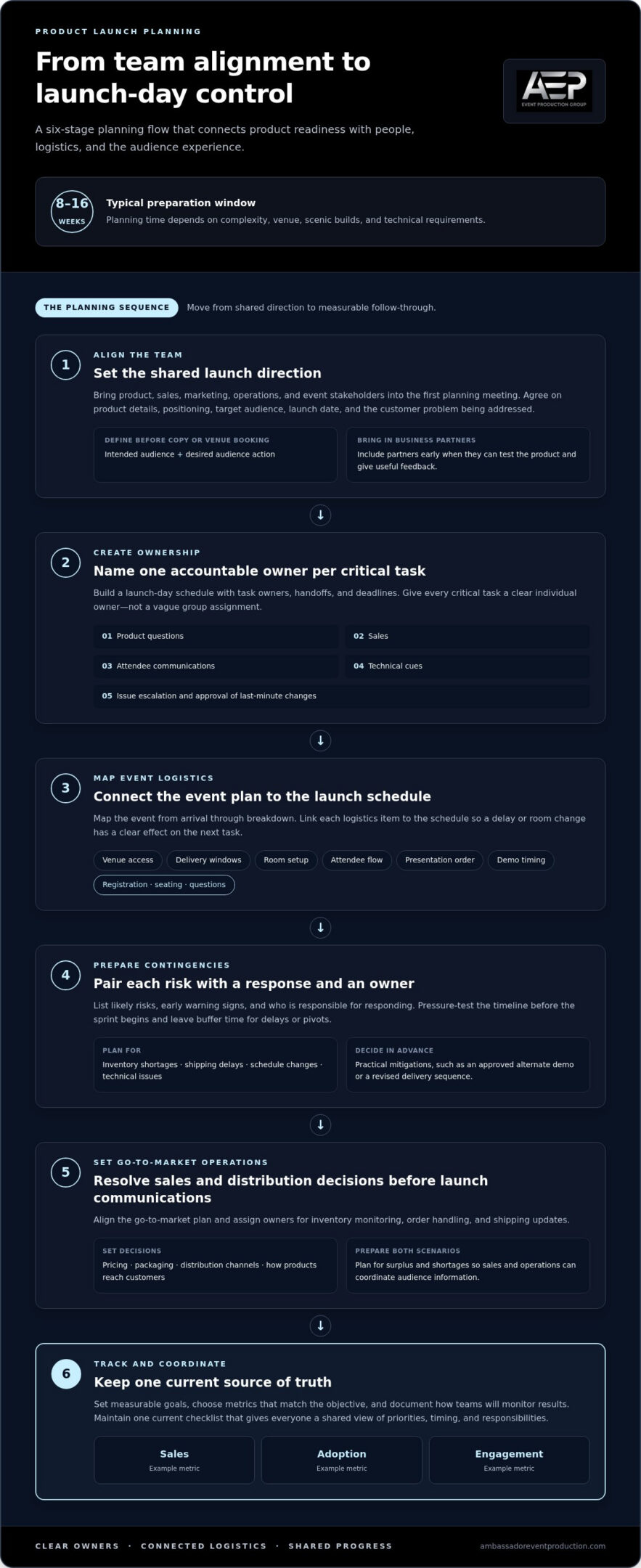
Start planning across departments early, then connect product readiness with event logistics, sales, and distribution. Product launch preparation typically takes 8-16 weeks, depending on complexity, venue, scenic builds, and technical requirements.
- Bring product, sales, marketing, operations, and event stakeholders into the first planning meeting. Align on product details, positioning, target audience, launch date, and the customer problem being addressed. Before writing campaign copy or booking a venue, define the intended audience and the action you want them to take. Include business partners early when they can test the product and provide useful feedback.
-
Assign Launch-Day Responsibilities
Create a launch-day schedule that identifies each task owner, handoff, and deadline. Assign leads for product questions, sales, attendee communications, technical cues, and issue escalation. For example, the person advancing a presentation should know who approves a last-minute change and who communicates it to the room. Give every critical task one accountable owner, not a vague group assignment.
- Map event logistics from arrival through breakdown. Record venue access, delivery windows, room setup, attendee flow, presentation order, and product demonstration timing. Link each item to the launch schedule, so a delayed shipment or room change has a clear effect on the next task. Keep the audience experience in view: registration, seating, demonstrations, and questions should suit the event format.
-
Develop Contingency and Risk Plans
List likely risks, early warning signs, and the person responsible for each response. Include inventory shortages, shipping delays, schedule changes, and technical issues in the risk plan. Pair each risk with a practical mitigation, such as an approved alternate demonstration or revised delivery sequence. Pressure-test the timeline before the sprint begins, and allow buffer time for delays or pivots.
- Set sales and distribution decisions before launch communications go live. The go-to-market plan should address pricing, packaging, distribution channels, and how products will reach customers. Assign owners to inventory monitoring, order handling, and shipping updates. Plan for both surplus and shortages, so sales and operations can coordinate their response rather than share conflicting information with the audience.
- Set measurable launch goals and track progress against them. Choose metrics that match the objective, such as sales, adoption, or engagement, and document how teams will monitor results. Build a checklist with task owners and deadlines, and maintain one current version as the team’s source of truth. This gives everyone a shared view of priorities, timing, and responsibilities.
Product quality and launch readiness criteria
Use a launch checklist to assess product quality, market fit, differentiation, sales and marketing readiness, and operational preparedness. Proceed when critical tests pass, teams can support customers, and launch materials are ready. Hold the release if a serious product issue remains unresolved.
-
Set Launch Readiness Criteria
Define pass conditions for each readiness area before reviewing the release. For product quality, list essential functions and acceptable results; for market fit, record the target customer need the product addresses. Check that the product’s difference from alternatives is clear and that sales, marketing, and operations can support the planned launch. A completed schedule alone does not prove readiness.
-
Conduct Pre-Launch Testing
Test the product with target customers in a controlled setting, then record their feedback and assign follow-up actions. Look for recurring usability problems, confusing instructions, and failures in important product tasks. Retest changes made in response. A soft or beta release can limit access to selected users, giving the team a defined group for preview feedback before a wider release.
- Review test results against the checklist, not personal impressions. Mark each item as passed, unresolved, or blocked, and assign an owner to every open issue. Set a clear release-stopping threshold, such as a defect that prevents a core task or repeatedly confuses customers. Keep lower-priority refinements visible, but distinguish them from issues that undermine product quality or safe customer use.
- Complete the materials and support customers need to use the product. Finalize packaging, documentation, and support channels, then test whether the instructions answer common setup and usage questions. Set up a straightforward process for recording bugs, assigning them to the right team, and tracking resolution. This gives customer feedback a practical path instead of letting reports disappear across separate inboxes.
- Brief and train internal teams before launch communications begin. Give sales and support staff the same product description, feature details, value proposition, and guidance for handling inquiries and orders. Share approved information through existing channels, such as a wiki, knowledge base, email list, or Slack channel. For example, sales should know how a feature works and where to route an unresolved technical question.
- Hold a go/no-go review with product, sales, marketing, and operations owners. Confirm that testing findings have actions, launch messaging is aligned, support channels are staffed, and unresolved issues meet the agreed release threshold. Capture the decision and any conditions in the checklist. If an event presentation also depends on technical systems, audio-visual technical support can help address that part of launch readiness.
Launch-day strategy and project coordination
Turn the launch strategy into an operating plan, from audience and objectives to day-of decisions. Link the technical requirements for a flawless product launch to measurable outcomes, clear timing, and team handoffs.
- Define the launch objective before selecting activities. A release may aim to generate sales, drive product adoption, or introduce a new offer to a specific audience. Choose the primary outcome and supporting measures, such as revenue, engagement, satisfaction, or customer feedback. Keep the objective visible in campaign briefs and team updates, so partners can make consistent decisions when priorities compete.
- Translate the objective into a coordinated go-to-market strategy. Set the value proposition, audience, launch timing, sales approach, and customer education plan in one working document. Then map each activity to its purpose. For example, a product demonstration can explain a key feature, while a sales asset can answer a buyer’s practical questions. This keeps separate teams from creating disconnected messages.
- Align product, marketing, sales, and customer support on positioning and readiness. Use a shared message sheet to define the problem solved, core benefits, approved language, and responses to common questions. Ask partners who support distribution or customer access to use the same product description. Review campaign assets together, so the landing page, sales presentation, and launch announcement communicate one clear value proposition.
- Coordinate launch-day activity with a timed run of show. Sequence each major moment, such as the product reveal, demonstration, customer questions, and sales handoff. Add the responsible role and the signal that moves the event forward. For a live demonstration, specify who introduces it, who operates it, and how the host proceeds if the display needs attention.
- Set a shared decision path for changes during launch. Identify who can approve revised messaging, pause a campaign, or escalate an issue that affects customers. Include technical requirements for a flawless product launch in this process, specifying who can adjust presentation cues or switch to approved backup assets. If a product detail changes, update affected channels together to prevent conflicting information.
- Monitor launch traction and use the results to guide adjustments. Track the chosen measures, including sales, adoption, engagement, satisfaction, and customer feedback. Compare performance with the launch objectives, then identify which channel or asset needs attention. Keep the strategy active after launch day: follow up with leads, share relevant coverage, and route customer feedback to the teams responsible for product updates.
Compare performance with launch goals and key performance indicators, using clear, measurable objectives to assess progress. A product launch strategy is a blueprint for introducing a new product to the market, covering marketing, sales, customer education, and customer support. It should set objectives, identify the target audience, clarify the value proposition, establish a go-to-market plan, and define success metrics. Keep progress visible against clearly defined success goals; for internal launch plans, achievement of those goals serves as a signal of launch success. For B2B go-to-market teams, align positioning, readiness, campaign timing, and clear owners for each handoff.
Preparing a day-of checklist
Build one live checklist that identifies each action, owner, timing, and completion status. Use it as the team’s shared source of truth when launch-day questions arise.
- Set the event timeline in sequence, from venue access and setup to the audience’s departure. Add each presentation cue, product reveal, demonstration, and transition. Name the person who calls each action and the next person who responds. Include planned start times and dependencies, so a late setup task signals which later points may need adjustment.
- Record room and equipment checks before attendees arrive. Assign owners to confirm the presentation display, microphones, playback, lighting cues, and internet-dependent features. Test the actual presentation files and demonstration content, not just the equipment in isolation. Note a backup action for each failure, such as switching to a prepared slide if a live demo stops working.
- Confirm that every presenter has the correct materials and knows the run of show. The checklist should identify the approved slide deck, product samples, demonstration sequence, and handoff cues. Ask presenters to check names, product details, and links before taking the stage. A final version-control check helps prevent an outdated deck from appearing during the reveal.
- Prepare an attendee and access checklist for registration staff. Include the guest list, check-in process, seating plan, access instructions, and a contact for late arrivals. If the event has live chat, Q&A, or polls, assign a moderator to manage incoming questions. Confirm that closed captioning and language options are ready for the audience.
- List launch-day communications and assign an owner to each action. Specify who sends the announcement, publishes approved assets, updates product channels, and responds to customer inquiries. Keep final copy and escalation contacts in the team’s shared location. If a product detail changes, route the update to every affected channel before teams share inconsistent information.
- Include a clear issue-response sequence. Name who receives a report, who decides the next action, and who informs the audience or internal teams. For example, a failed product demonstration may require a pause, a spoken explanation, and a switch to recorded material. Record the decision and action taken, so the team can follow the same process.
- Track launch measures alongside operational tasks. Assign an owner to monitor sales, adoption, engagement, customer feedback, or the measures tied to the launch objective. Define where updates appear and when the team reviews them. This makes it easier to spot a problem that needs action, rather than confusing event activity with launch results.
- Close the checklist with post-event responsibilities. Assign owners to follow up with leads, route customer feedback, and handle support questions, returns, or exchanges. Capture unresolved issues before the team disperses. Mark each action complete only after its owner records the result, so open points remain visible and the next step is clear.
Staging, lighting, sound, and audiovisual production
Make the stage, lighting, audio, and visuals support one clear product story. Add each technical decision to the launch plan, and test its effect on messaging and the audience experience.
- Plan the stage around the product reveal and audience sightlines. Position the presenter, product, screens, and demonstration area so attendees can follow each moment. Walk through the room from different seats, then adjust anything that blocks a screen or display. Coordinate staging and rigging with the event layout, presentation cues, and equipment needs.
- Design lighting to guide attention throughout the event. Set distinct cues for the welcome, presenter, product reveal, and demonstration, then rehearse the transitions. Avoid lighting that washes out screen content or makes the product hard to see. Because lighting can shape how attendees perceive a brand, align each look with the product’s identity and launch messaging.
- Plan audio for clear speech and controlled transitions. Test microphones with each presenter, check playback levels, and listen from audience areas, not only beside the sound system. Mark who starts and stops music or video cues. For a product demonstration, confirm that spoken explanations remain clear while accompanying sound plays.
- Match video and presentation content to the room and show sequence. Review every slide, product image, video, and transition on the actual display system. Confirm that text is readable from the back and that visuals support the presenter’s words. Keep a presentation copy available for the operator, and identify the correct file before doors open.
- Connect the technical run of show to the audience journey. Name the operator for each sound, lighting, and video cue, and give presenters clear transition signals. Rehearse the product reveal from introduction through demonstration. If a cue is missed, agree on a recovery point, such as continuing with the next spoken section rather than restarting.
- Include access and participation features in the production plan. Prepare closed captioning and language options, then test them with the presentation content. If the launch uses live chat, Q&A, or polls, assign a moderator and decide how questions reach the presenter. Review attendee feedback after rehearsal and adjust pacing, visibility, or audio as needed.
- Plan how the event’s visual and audio assets will carry into social media and post-launch communications. Capture approved product footage and clear presenter audio, and align recording cues with the run of show. For integrated support with staging, lighting, sound, and video, coordinate audiovisual production for your launch.
Prepare images and demonstration material for reuse, making sure every approved asset reflects the product story presented in the room. Keep closed captioning and multiple languages aligned with the presentation and any reused audiovisual material. Test them alongside the final content so they remain clear during transitions. Coordinate operators and presenters on when each asset appears, and make sure the recovery plan still works if a visual or audio cue is missed. This keeps accessibility, messaging, and the live experience connected from the reveal through follow-up communications.
Ambassador Event Production: Video Production Services
Ambassador Event Production supports product launches with Video Production Services and coordinated event technology. When your presentation depends on clear visuals, dependable sound, and purposeful lighting, its team brings these elements together through Audio-Visual Technical Support, Audio Production Services, and Lighting Design and Execution.
Turn to this support when your launch includes a live product reveal, a video presentation, or an event where sound and lighting shape the audience experience. A coordinated technical approach connects the presentation to the message instead of treating each production element as a separate task.
Share your launch requirements with Ambassador Event Production to discuss how its production services can support your event.
Bring Your Launch Vision Into Focus
A launch is also an opportunity to shape how people remember your product. In your next planning conversation, decide what the audience should see, hear, and understand, then make sure production choices support that intention. A clear plan for the technical requirements for a flawless product launch connects the product story with the experience around it.
For the production needs behind that experience, Ambassador Event Production offers Video Production Services, Audio-Visual Technical Support, and Audio Production Services. These services support launches where video, sound, and technical execution need to work together. Share your event goals and production priorities to start a focused conversation about next steps.
Contact Ambassador Event Production to discuss your launch. With a clear direction and the right preparation, you can give your product a confident introduction.
Frequently Asked Questions
What backup, disaster recovery, and rollback plans are needed for a product launch?
Prepare separate responses for restoring data, recovering service, and reversing a problematic release. Before launch, preserve a recoverable copy of essential data and configuration, document who can restore it, and record the steps in sequence. Define rollback triggers, such as failed payments or widespread access errors, and name the decision-maker. Test the fallback in a controlled environment, then prepare a customer message explaining what changes and where to get help.