
Evaluating Event AV Proposals for Reliable Backup Coverage
A low bid can leave a live show exposed if its backup plan is vague. Knowing how to evaluate event AV proposals means looking beyond the equipment list: check whether the plan identifies backup systems, who responds if something fails, and how technicians are assigned for setup, rehearsal, and show time. Reliable coverage should be defined in the production plan, not assumed.
It’s reasonable to focus on equipment and price, but a proposal’s details show whether the team has planned for schedule changes and technical issues. This guide explains how to assess redundancy, site visits, labor plans, technical expertise, and equipment scope, so you can compare the support each proposal actually describes. You’ll see what a site visit should clarify, how to review crew roles and timelines, where a low bid may leave gaps, and how to compare general-session and breakout-room needs. A clear framework helps you choose a plan suited to the event, from load-in through strike.
Key Takeaways
- Use a technical site visit to clarify room conditions, venue constraints, and the equipment each space needs.
- Compare crew roles and coverage across load-in, rehearsals, live sessions, and strike, not just the total headcount.
- Look beyond a low bid to spot missing preparation, backup systems, staffing, or other scope that could affect show-week reliability.
- Compare equipment by the audience experience and room requirements, including how the plan can adapt if the event changes.
1. Why Technical Site Visits are Vital for AV Proposals
A technical site visit lets the AV team assess conference rooms before pricing equipment and labor. Walk through the general session and breakout spaces together. Note sightlines, access routes, power locations, rigging points, and venue restrictions. Then compare each proposal against the same room-by-room requirements. A visual inspection can explain why plans differ on screens, audio coverage, or setup time. Without that shared view, equipment lists may describe different outcomes.
Organize proposals into consistent categories: general-session equipment, breakout equipment, other equipment, onsite labor, setup and strike labor, travel and technician expenses, pre-production, and other charges. Compare specifications within each category, such as screen size, audio coverage, and assigned technicians. Check that category totals add up to the proposed total. Separate included items from exclusions, including venue-controlled costs. Knowing how to evaluate event AV proposals means comparing equivalent scopes, not just totals.
A spreadsheet can align vendor responses in columns, but it may not keep the latest plans, schedules, and revisions together. Event proposal software can centralize timelines, budgets, venue details, contracts, and equipment lists. Choose a workflow that tracks current versions and decisions. A practical part of how to evaluate event AV proposals is ensuring that responses reflect the same specifications and revisions.
Insurance, safety, and venue requirements depend on the venue and event arrangements. Document applicable venue requirements, required paperwork, and responsibility for meeting them in the proposal and contract.
Ask who leads the technical plan, what the site visit revealed, which costs are excluded, and how rehearsals and last-minute changes are handled. Request relevant event examples and a named point of contact.
The contract should explain cancellation terms, overtime approval and billing, and how schedule or content changes affect the scope. Review those terms alongside the proposal before signing.
For a large conference, request an AV proposal at least 12 weeks in advance. That allows time to assess the site, align technical specifications, and develop the production plan.
2. Assessing labor plans and show-week risk
Crew count alone won’t show whether the production plan covers every critical task. Compare roles and responsibilities across load-in, setup, testing, rehearsal, live execution, and strike. For example, identify who manages presentations, operates audio, and coordinates lighting cues. A proposal that names a Technical Director to oversee the build and show gives you a clear lead for technical decisions.
Match labor assumptions to the event schedule. Include setup days, speaker preparation, rehearsals, session transitions, and load-out in the timeline. These details affect crew size, equipment transport, and staffing hours. Ask how the team will handle a revised presentation, a speaker running long, or a schedule change. The proposal should explain who can approve additional work and how the crew will respond without leaving another room unsupported.
Review onsite support by phase, not just by total hours. A technician may be needed during setup and testing, while live sessions may require separate operators for audio, video, and lighting. Check whether rehearsal coverage includes testing slides, microphones, playback, and lighting cues with presenters. Then compare coverage across rooms during the show. One person assigned to overlapping sessions can leave a gap, even if the overall headcount looks substantial.
Lighting plans also need clearly assigned responsibilities. Look for a lighting operator during rehearsals and show execution, plus a defined handoff when cues or room schedules change. Confirm whether the listed crew covers setup and strike or only live operation. Labor is a major part of an audiovisual contract, so compare duties and timing rather than choosing by headcount alone.
For practical risk control, map each role to a time and room, then identify who handles backup systems and last-minute content changes. Check each room’s AV setup and operator at least one hour before its session starts. This early review can surface missing coverage while there’s still time to address it. If your event needs coordinated technical execution, audio-visual technical support can help align crew responsibilities with the run of show.
3. Evaluating low bids and technical competency
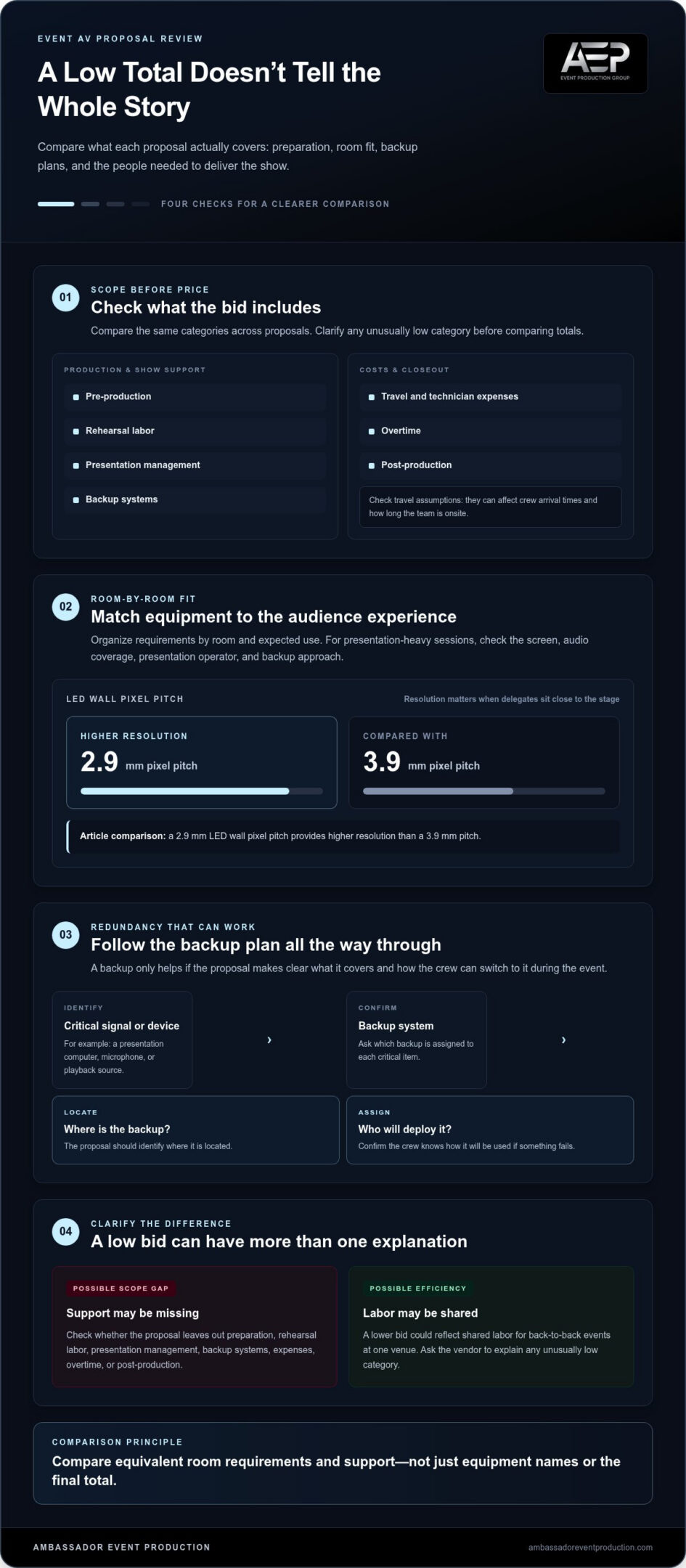
Compare the scope before deciding on a low total. Check whether each proposal includes pre-production, rehearsal labor, presentation management, backup systems, travel, technician expenses, overtime, and post-production. Travel assumptions can affect crew arrival times and how long they’re onsite, so compare the stated schedule and staffing. A lower bid may reflect missing support, but it could also reflect efficiencies, such as shared labor for back-to-back events at one venue. Ask for clarification about any unusually low category.
Equipment and crew needs depend on the room, program, and audience. Organize requirements room by room, then match each technical plan to its expected use. For a presentation-heavy session, identify the screen, audio coverage, presentation operator, and backup approach. Image resolution also matters: a 2.9 mm LED wall pixel pitch provides higher resolution than a 3.9 mm pitch, which can matter when delegates sit close to the stage. Compare the intended audience experience, not just equipment names.
Assess technical redundancy by identifying the backup system for each critical signal or device, where it is located, and who will deploy it. The proposal should explain how the AV team will respond if a presentation computer, microphone, or playback source fails. A backup only helps if the crew can switch to it during the event. Ask the team to show these dependencies on room diagrams and explain how the plan supports concurrent rooms.
Technical expertise should be clear in the staffing plan and relevant references. Look for a Technical Director responsible for the build and show, alongside clearly assigned audio, video, and lighting operators. Ask for references related to your industry and event type, then discuss similar room layouts or program demands. Confirm who makes technical decisions onsite and how revised content reaches the right operator. These details help show whether the team’s experience matches the audience, venue, and production demands.
4. General session and breakout equipment scope
Compare general-session proposals against the same audience size, stage layout, and program format. For a session expecting 500 attendees, check whether each plan addresses screen visibility, room-wide audio, presentation playback, and camera coverage. General-session equipment often creates the largest differences between proposals, so compare the intended outcome, not just item names. Ask how the proposed setup supports speaker visibility and audience engagement, then note where equipment quantities or functions differ.
Assess breakout rooms individually. A room for 75 attendees may need a different screen, microphone setup, and operator plan than a larger general session. Compare each vendor’s scope against the same agenda and room use. If one proposal lists less equipment, identify which audience or presentation need that difference affects. Large differences in breakout expenses deserve attention because vendors may be proposing different experiences rather than equivalent packages.
Review equipment categories alongside the backup plan. Identify the primary display, audio components, presentation sources, and backup systems for critical items. Check whether the proposal explains how a backup will be used during a session and who is responsible. If the schedule changes, for example, with a new breakout or remote presenter, the equipment plan should show how the setup will adapt.
Include support spaces as well as stages and meeting rooms in the scope. Registration areas, rehearsal rooms, evening events, overflow spaces, boardrooms, and signage monitors may all need equipment. Compare these spaces with the event schedule so the proposal reflects where attendees and speakers need technical support. Track equipment by room and session, and keep the latest list aligned with the timeline. This makes additions and overlapping resource needs easier to spot before show day.
For a room-by-room equipment plan that fits your event schedule, plan your AV technical support with a production team.
Ambassador Event Production: Video Production Services
Ambassador Event Production supports event teams with video production and coordinated technical execution for professional gatherings. Its Video Production Services support event visuals, while Audio-Visual Technical Support brings the technical elements together. Audio Production Services and Lighting Design and Execution address sound and lighting needs within the production scope.
Turn to this kind of integrated support when your proposal review shows that video, audio, or lighting requirements need careful coordination across the program. A clear discussion of your event schedule, room needs, and production priorities can help shape the right technical approach. For event support aligned with your production requirements, contact Ambassador Event Production.
Set Your Event Up for a Confident Next Step
Reviewing proposals can do more than help you select a supplier. It creates a shared understanding of the event’s needs, how production decisions will be made, and which details need attention before the show. Use that clarity to align stakeholders around the audience experience and the technical support needed to deliver it.
Knowing how to evaluate event AV proposals helps you move from comparing documents to shaping a production plan around your priorities. Ambassador Event Production provides Video Production Services, Audio-Visual Technical Support, and Audio Production Services for professional events. Share your goals and event requirements to discuss how the technical scope can support them.
Contact Ambassador Event Production to discuss your event’s production needs. A clear next step can help your team move forward with purpose and focus on the experience you want to create.
Frequently Asked Questions
How can I ensure my event has adequate technical redundancy?
Match likely failure points with a backup and a person responsible for switching to it. For example, identify an alternate presentation source, confirm it has the current slides, and name who will take over if the primary computer fails. Include a communication cue for the speaker and show caller, so they know whether to pause, continue, or move to another segment while the crew restores the main system.
How do I compare AV quotes from different production companies?
Compare proposals against one shared event brief, then create a side-by-side matrix covering each room, service, crew role, and excluded item. A lower total may reflect a different scope, not better value. Mark each difference and ask how it affects the audience experience. For example, check whether both quotes include the same speaker playback, recording needs, and session transitions before comparing totals.
Should labour costs be included in the initial AV proposal?
Yes. The proposal should show labor as separate line items or explain it clearly within a package. Look for roles, work phases, and each person’s responsibilities. A technician listed for setup may not also operate a session or manage a changeover. Clear labor details help you understand what the proposal covers and assess the operational impact of adding rehearsals or sessions.
What are the most important technical details to include in an AV proposal?
Include event dates, room assignments, session formats, audience needs, presentation requirements, and planned technical responsibilities. Add a current run of show and explain how content revisions will reach operators. For example, if a keynote includes slides and video playback, specify both and identify who manages transitions. Clear assumptions and exclusions also help prevent confusion about responsibilities if plans change.
What is a technical site visit and why is it necessary for a proposal?
A technical site visit is a walkthrough focused on the venue’s practical production conditions. The team can compare the floor plan with the actual room, review access and equipment movement, and identify details that affect setup. Bring the latest agenda and room diagrams. If a stage or room layout changes after the visit, record the revision so the proposal assumptions stay aligned with the event plan.
What is the difference between a dry hire and full technical production?
Dry hire generally means equipment is supplied without the crew and operational support needed to set up and run it. Full technical production combines equipment with technical planning, setup, and show execution. Ambassador Event Production provides professional event production, including equipment, expert technicians, and setup support. This distinction matters if your team needs technical operation as well as equipment for the event.