
Ways to Coordinate Corporate Event Camera Coverage
More cameras don’t automatically mean better coverage; the right count depends on what needs to be seen at the same time. A multi-camera setup for corporate events commonly uses four cameras for a general session or keynote, while large-scale events often call for six to eight. The camera plan should follow the stage, the schedule, and the moments that matter.
Camera count matters, but so do coordinated positions and clear communication between operators. This guide explains how to match coverage to an event, plan camera positions around the stage layout and lighting, and coordinate operators so key moments aren’t missed. Larger productions may need six to eight cameras, particularly when several areas or acts require coverage at the same time.
Key Takeaways
- Match camera coverage to the session: a four-camera arrangement can capture the stage, speaker close-ups, and audience reactions.
- Coordinate operators with clear communication so camera changes support the event rather than compete for the same shot.
- Plan camera positions around sightlines, stage layout, and lighting to reduce blind spots and overlapping coverage.
- For large-scale events with multiple acts or areas to cover, consider how six to eight cameras can serve the production’s needs.
1. Four-camera coverage for corporate general sessions and keynotes
A multi-camera setup for corporate events commonly uses four cameras for general sessions, conference keynotes, and award presentations. This gives the production several angles on the same moment instead of relying on one fixed view. For a keynote, the cameras can capture the speaker, stage, and audience reactions simultaneously, giving editors more options for the finished footage.
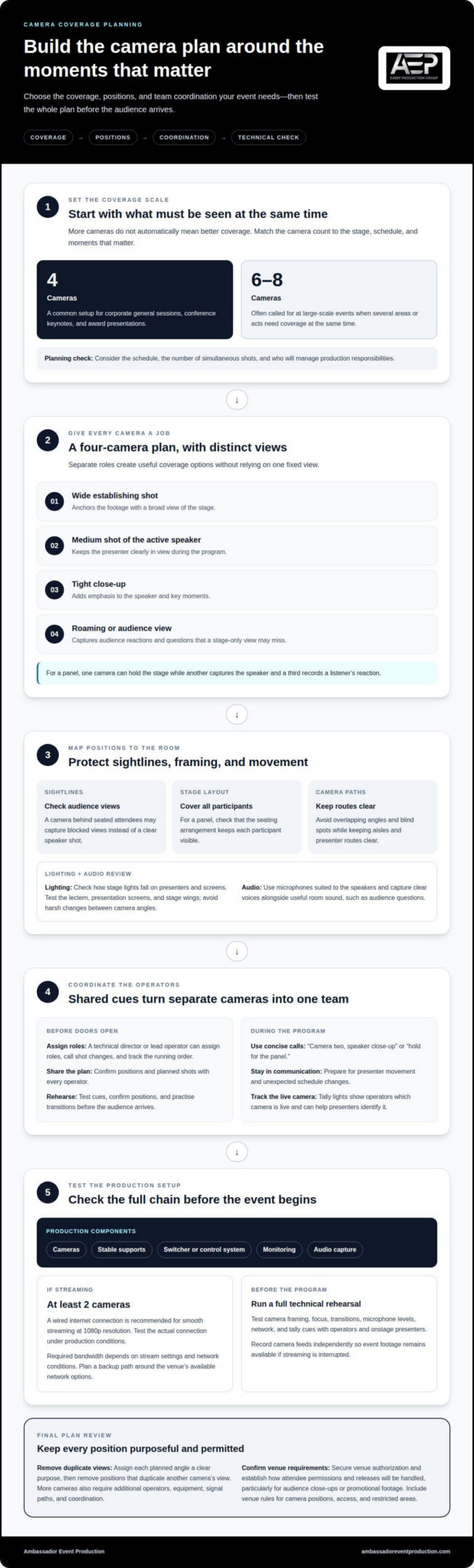
A four-camera plan typically gives each camera a distinct role: a wide establishing shot, a medium shot of the active speaker, a tight close-up, and a roaming or audience view. The wide shot anchors the footage, while close-ups add emphasis. An audience camera captures reactions and questions, giving editors more options for the final video.
Multiple angles are useful at live events, where attention can shift quickly. At a corporate panel, one camera can hold the stage while another captures the speaker and a third records a listener’s reaction. Sports coverage uses the same principle: separate views follow the action and show responses a single camera might miss. A multi-camera setup for corporate events brings this flexibility to business programs.
An in-house team may be a fit if it can coordinate camera operators, manage recording, and deliver the footage you need. A multi-camera event production company is useful when the event requires dedicated operators, live switching, or a polished edit. Consider the schedule, the number of simultaneous shots, and who will manage production responsibilities.
Before filming, secure venue authorization and establish how attendee permissions and releases will be handled, particularly for audience close-ups or promotional footage. Venue rules may govern camera positions, access, and recording in restricted areas. Include those requirements in the camera plan for a multi-camera setup for corporate events.
More cameras create more coverage options, but also require additional operators, equipment, signal paths, and coordination. These needs affect production complexity and budget. Assign each planned angle a clear purpose, then remove positions that duplicate another camera’s view.
2. Experienced technical staff and camera operator coordination
Give camera operators a shared plan before doors open. A technical director or lead operator can assign roles, call shot changes, and track the running order. During a keynote, for example, one operator can hold the speaker while another prepares to capture an audience question. Clear assignments help prevent missed moments and conflicting movements.
Use headsets or walkie-talkies for concise calls such as “camera two, speaker close-up” or “hold for the panel.” Operators need to communicate throughout the program, especially when a presenter leaves the lectern or the schedule changes unexpectedly. A brief rehearsal gives the team time to test cues, confirm positions, and practise transitions before the audience arrives.
A corporate production typically needs cameras, stable supports, a switcher or control system, monitoring, and audio capture. A live-streaming setup needs at least two cameras; the specific equipment depends on whether the production records, streams, or does both. Microphones help capture clear speech, while a wired internet connection is recommended for smooth streaming at 1080p resolution.
Tally lights show operators which camera is live, helping them avoid unexpected moves. They can also help presenters identify the active camera and address the remote audience. Before the program begins, technical staff should test the cues with each operator and onstage presenter, then confirm that signals are visible from working positions.
During live streaming, the technical team monitors camera feeds, sound, and the network together. A switcher operator can cut between views as the director calls them, while camera operators prepare upcoming shots. If a feed fails or a cue changes, the team needs a clear communication path and a known troubleshooting lead. These responsibilities are part of coordinated audio-visual technical support, particularly for productions with several simultaneous feeds.
3. Planning camera positions, lighting, and stage layout
Start with the stage plan and audience sightlines, then mark each camera’s position and movement. A camera behind seated attendees, for example, may capture blocked views instead of a clear speaker shot. Avoid overlapping angles and blind spots while keeping aisles and presenter routes clear. For a panel, check that the seating arrangement allows each participant to remain visible.
Lighting affects the image from every camera position. Check how stage lights fall on presenters and screens: a bright display can compete with a dimly lit speaker. For a keynote, test the lectern, presentation screens, and stage wings. Lighting should keep presenters visible as they move, without creating harsh changes between camera angles.
Audio needs equal attention. Use microphones suited to the speakers and capture clear voices alongside useful room sound, such as audience questions. Match the lighting and audio equipment to the venue, stage layout, and recording plan. A technical test can reveal whether speech is clear from every camera position.
For a live stream, a wired internet connection is recommended for smooth delivery at 1080p resolution. Required bandwidth depends on the stream settings and network conditions, so test the actual connection under production conditions. Plan a backup path around the venue’s available network options, and record camera feeds independently so the event footage remains available if streaming is interrupted.
Schedule sound, lighting, camera, and network tests well before the event. A full rehearsal lets presenters walk the stage while operators check framing, focus, transitions, and microphone levels. It can also reveal practical issues, such as a camera blocking an audience view or a speaker stepping outside the lit area.
Map the event schedule to the intended deliverables. Mark key moments, including audience questions and award presentations, so the recording covers both the full event and potential social media clips. A planned mix of wide, close-up, and reaction shots gives editors options without leaving important action uncovered.
4. Six- to eight-camera setups for large-scale events
Large general sessions, multi-act award shows, and events covering several areas may call for six to eight cameras. The deciding factor is simultaneous action: if a keynote continues while activity takes place elsewhere, one stage view cannot capture both effectively. Plan coverage around what the live audience must see and what editors will need afterward.
Give every camera a distinct visual role. At an awards show, positions might cover the host, presenters, recipients, audience reactions, and a wide stage view. For an event with multiple rooms, assign cameras to each active area and avoid giving two operators the same view. Roles can change between program segments, but each change needs a clear cue.
A switcher lets the technical director select among live camera feeds and create a program in real time. During a panel, the director might move from a wide stage view to a close-up of the speaker, then cut to an audience question. A planned sequence keeps the visual pace purposeful rather than relying on effects to disguise missed coverage.
For later editing, ISO recording captures each camera’s full, uncut feed alongside the live-switched program output. This gives editors more options when creating an event video or highlight reel. It can also help when a live switch misses a reaction or a speaker changes direction unexpectedly. Confirm the recording plan before production, since a live program and an edited deliverable require different workflows.
More cameras mean more operators, feeds, positions, and communication needs. A production lead should align camera assignments, switching cues, and recording responsibilities with the event schedule. Test the full signal path before doors open, then rehearse key transitions, such as moving from a keynote to an award presentation. This ensures the camera count serves the program rather than adding unnecessary complexity.
For coordinated support with a large-scale event’s camera feeds and live switching, plan your event’s audio-visual technical support.
Ambassador Event Production
Ambassador Event Production brings camera coverage, sound, and stage presentation together for corporate events. Its video production and audiovisual technical support help coordinate camera assignments, signal flow, and event-day production. Audio production services and lighting design and execution help align clear speech and stage visibility with the intended footage.
Turn to Ambassador Event Production when your event needs coordinated technical planning, multiple camera perspectives, or a recorded program for later use. The right approach depends on the schedule, venue, stage layout, and whether the production is recorded, streamed, or both. Share your event goals and coverage needs to shape a production plan around what matters on stage and to your audience.
Contact Ambassador Event Production to discuss your corporate event camera coverage.
Turn the Coverage Plan Into a Production Brief
Turn camera coverage into a shared production brief. Define what the recording should help your audience understand, who will use the footage, and which moments deserve special attention. These decisions connect the live event with its future use, without adding cameras or complexity that do not serve the goal.
For a multi-camera setup for corporate events, align the brief with the program schedule, venue, and intended deliverables. A leadership presentation, internal town hall, and award ceremony may call for different priorities, even when they share a stage. Clear decisions help the production team coordinate visual coverage and technical support around the event’s purpose.
Ambassador Event Production can help translate those priorities into a coordinated production plan. Contact Ambassador Event Production to discuss the goals for your event and its camera coverage. A thoughtful conversation is a practical place to begin shaping a production that serves your audience and the way you’ll use the recording.
Frequently Asked Questions
How many cameras are recommended for different corporate event sizes and formats?
Choose the camera count based on the people, stages, or activities that need coverage at the same time. A panel with two or three participants may work with two cameras, while corporate general sessions and keynotes commonly use four. Large sessions, award shows, or events covering multiple areas may need six to eight cameras. The format and simultaneous action matter more than audience size alone.
What are the best camera positions for filming a corporate event?
Position cameras to capture useful views without blocking attendees, presenters, or screens. For a panel, consider a wide view that keeps all participants in frame and another position for individual speakers and audience questions. Check sightlines from seated areas and account for entrances and walk-on routes. A venue walk-through can reveal obstructions that a stage diagram may not show.
How do you synchronize and switch multiple cameras during a live event?
Synchronize footage using timecode or audio waveform matching, then route camera feeds to a switcher for live cuts. The director calls each shot, and the technical director switches to the assigned feed. Before the event, test synchronization and switching during a rehearsal with all cameras recording. If editors need flexibility afterward, capture each camera’s uncut feed as well as the switched program.
How much does multi-camera corporate event production cost in the United States?
Production pricing depends on the event’s requirements and is provided after a quote request. Key factors include camera count, operator and technical crew needs, event duration, venue layout, live switching or streaming, and editing requirements. A straightforward recorded session has different production needs from a program with multiple stages and simultaneous coverage. Define the intended deliverables to clarify the scope.
What are common multi-camera event production risks and how can you prevent them?
Common risks include blocked views, missed cues, audio problems, and camera or signal failures during the program. Reduce these risks with a venue walk-through, written shot schedule, and rehearsal that tests every camera and microphone. Assign a clear communication lead and plan how the team will respond if a camera or signal path fails, including how recording will continue.