
AV checklist for annual general meetings, from setup to voting
A small AGM still needs clear sound and reliable participation, but may not need a production-heavy setup. An AV checklist for annual general meetings (AGM) should reflect the format, room, and voting needs, especially for remote attendees who must be able to hear, ask questions, and vote. The right level of support depends on what participants need to do.
It’s reasonable to ask whether a smaller meeting needs professional AV. Headcount alone is not the deciding factor: poor audio, hard-to-read presentations, or a voting process that excludes remote members can disrupt proceedings at any scale.
This guide covers practical checks for hybrid participation, livestreaming, secure remote access, voting, rehearsals, and equipment testing. Use it to identify the essentials and organize technical preparation from initial setup through the meeting.
Key Takeaways
- Plan the meeting so remote and in-room participants can follow proceedings, ask questions, and take part in voting.
- Protect remote participation by planning reliable connectivity and clear access procedures before meeting day.
- Use a rehearsal to run through the agenda, voting, Q&A, and backup procedures before the AGM goes live.
- Test microphones, speakers, cameras, screens, and presentation content in the actual room so technical issues can be addressed before attendees arrive.
Hybrid participation, livestreaming, and voting
A hybrid AGM needs room microphones, cameras, a streaming platform, and clear audio routing. A virtual meeting uses cameras and microphones to carry speakers and presentations online. Both formats need a platform that supports secure access, questions, and voting, so shareholders can follow proceedings and participate from their devices.
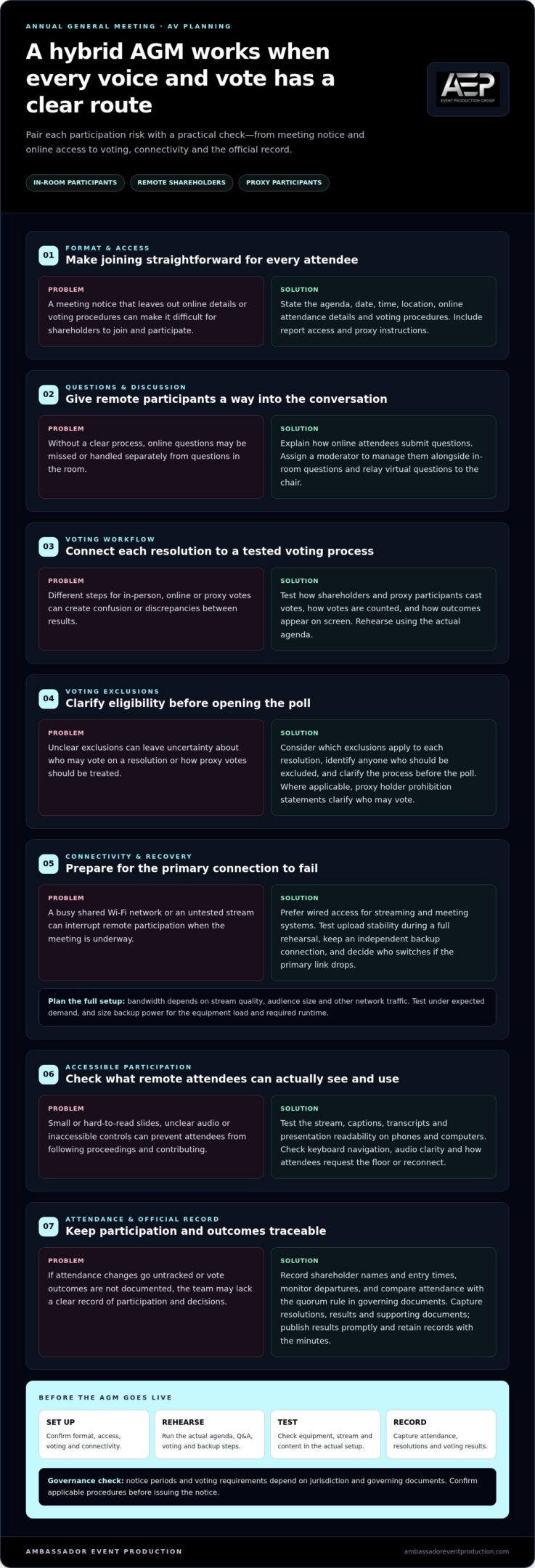
- Match the meeting notice to the format. State the agenda, date, time, location, online attendance details, and voting procedures. Include report access and proxy instructions, so shareholders can join and appoint a proxy correctly.
- Give remote participants a clear route to speak. Set out how online attendees can submit questions, then assign a moderator to manage them alongside in-room questions. Structured Q&A helps both groups take part in the discussion.
- Connect the voting workflow to each resolution. Test how shareholders and proxy participants cast votes, how results are counted, and how outcomes appear on screen. A consistent process helps reduce discrepancies between in-person and online voting.
- Document voting exclusions before opening the poll. Consider whether voting exclusions may be relevant to each resolution, and clarify the voting process before the poll. Where applicable, proxy holder prohibition statements also clarify who may vote on a resolution.
- Check the stream and platform on different devices. Test captions, transcripts, and presentation readability on phones and computers. Clear audio, visible slides, and accessible participation features help remote shareholders follow the meeting.
- Plan how results become part of the official record. Assign someone to capture resolutions, voting results, and supporting documents in the meeting record. Publish results promptly after the AGM, and retain the records with the minutes.
Notice periods and voting requirements depend on jurisdiction and governing documents. Confirm the applicable procedures before issuing the notice, then rehearse the platform’s Q&A and voting steps using the actual meeting agenda.
Hybrid setups can combine venue AV, livestreaming, interactive Q&A, and secure voting for remote and in-person participants. AGM AV can also display live vote outcomes on large screens and support proxy participants.
For resolutions that may involve voting exclusions, check which exclusions apply and identify anyone who should be excluded. Submitting voting exclusions early can help proxy voting results reflect them.
Secure connectivity for remote attendees
Plan bandwidth around the platform’s stream quality, audience size, and other network traffic. No single connection speed suits every AGM. Test the actual setup under expected demand, and plan backup power for the equipment load and required runtime.
- Use a stable primary connection. Prefer wired network access for the streaming and meeting systems, and avoid relying on a busy shared Wi-Fi network. Test upload stability during a full rehearsal, not just a quick speed check.
- Plan a separate connection for failure recovery. Keep an independent backup connection available, and decide who switches over if the primary link drops. Protect essential AV and network equipment with backup power sized for the planned load.
- Control registration and access. Send each registered attendee clear joining instructions in advance, including the agenda, access steps, and support contact for meeting-day login problems. Use individual credentials or controlled entry rather than a public meeting link.
- Track attendance for quorum. Record shareholder names and entry times, then monitor departures during the meeting. Compare attendance with the quorum rule in the organization’s governing documents before business begins and before a vote.
- Make virtual participation accessible. Choose a platform that works across devices and supports accessibility requirements, including captions and transcripts. Test keyboard navigation, readable slides, and audio clarity so attendees can follow the agenda and contribute.
- Keep remote attendees engaged. Explain how to request the floor, submit questions, and reconnect if disconnected. Assign a moderator to monitor the virtual queue and relay questions to the chair.
AGM systems can support thousands of online attendees, but capacity depends on the complete setup, including the platform, network, and production workflow. A practical remote AGM technical plan should test access, stream stability, attendance records, and recovery steps together, so the team knows what to do when a connection fails.
Technical rehearsals and venue coordination
Set the AGM date and format before booking a venue, then align production needs with governance tasks. Start the venue and technical plan 8-10 weeks before the meeting. This gives the board time to coordinate room access, presentations, resolutions, and remote participation.
- Shortlist venues against the meeting format. Check sightlines, room layout, power access, camera positions, and internet arrangements. A room that suits board members in person may still make remote presenters or screens difficult to see.
- Coordinate venue access and digital security. Confirm when the production team can enter, where equipment can be placed, and how access is controlled. Limit meeting-platform permissions to assigned roles, and keep confidential documents out of public view.
- Match room capacity to the agenda. Map seating, registration, presenter positions, and screens against expected attendance. Leave clear movement routes and ensure every seat has a view of the chair and any displayed resolutions.
- Develop the run of show and presentation deck. Identify each speaker, slide change, video cue, and voting transition. Prepare a clear record of cue ownership so the chair, presenters, and technical team know what happens next.
- Schedule a complete technical rehearsal. Run the agenda in sequence, including remote speakers, Q&A, and voting. AGM planners should prepare rehearsals, backups, and technical testing 1-2 weeks before the meeting.
- Test contingency steps in the room. Practise switching to backup equipment or moving to an alternate connection. Confirm who informs attendees and who records decisions if a technical interruption affects proceedings.
During rehearsal, check audio coverage, camera framing, lighting, slide readability, and transitions between agenda items. Smooth proceedings depend on clear handoffs: the chair leads discussion, the moderator manages participation, and the technical lead handles cues. Record unresolved issues, assign an owner to each, and retest affected systems before doors open.
Pre-meeting setup and equipment testing
For clear AGM speech, choose microphones suited to the room and speaker positions. Give the chair a dedicated microphone and provide handheld microphones for audience questions. Test speaker coverage throughout the seating area to catch feedback or quiet spots.
Typical equipment includes microphones, speakers, a mixer, presentation computer, projector or display, cameras, and connection cables. Hybrid meetings also need a streaming setup that captures presenters and slides clearly.
Build an in-person checklist that lists each agenda cue, the required equipment, the person responsible, and the test result. Include speaker positions, presentation files, power, room audio, and backup equipment for essential items.
Choose a screen or projector visible from every seat, and add a confidence monitor if presenters need one. Check slide readability, video playback, camera framing, and lighting from the audience’s perspective.
Test livestreaming and recording with the actual cameras, microphones, slides, and platform. Watch the stream on a separate device, listen for audio problems, and confirm that the recording captures the full meeting.
- Confirm the final agenda and reports. Match presentation files to agenda items so speakers display the correct material.
- Label microphones and cables. Clear labels help the team connect and troubleshoot equipment efficiently.
- Assign a decision maker to each live function. Named roles clarify who handles sound, slides, cameras, and meeting cues.
- Check the room layout before testing. Seating and presenter positions affect microphone pickup and screen visibility.
- Keep test results and instructions together. A single checklist helps the team resolve issues before the meeting deadline.
AV setups can be installed, tested, and commissioned within a few days. Co-operatives should test equipment and prepare the room a few days or the day before the AGM. Run final checks in the actual room, with the agenda and speakers present.
For coordinated setup and testing, use Audio-Visual Technical Support for your AGM.
Ambassador Event Production: Video Production Services
Ambassador Event Production supports AGM production with Video Production Services and Audio-Visual Technical Support. Turn to the team when your meeting needs coordinated technical execution, from clear audio and lighting to recorded or streamed video.
For a hybrid AGM, Audio Production Services can support intelligible speech, while Lighting Design and Execution helps presenters remain visible on camera. Coordinating these elements with the agenda and room setup can help shareholders follow proceedings and presentations.
Share your meeting format, production needs, and key agenda moments to start a practical conversation about the technical approach.
Visit ambassadoreventproduction.com to discuss support for your AGM.
Turn Your AGM Plan Into a Clear Production Brief
Make your AV checklist for annual general meetings (AGM) a working document, not a task list that ends after testing. Use it to keep decisions, responsibilities, and meeting priorities aligned as plans develop. A clear production brief also helps presenters understand what to prepare and gives the technical team a shared reference.
For production support, Ambassador Event Production offers Video Production Services, Audio-Visual Technical Support, and Audio Production Services. These services can bring the meeting’s audio and visual requirements together around its format and agenda.
Share your AGM production needs with Ambassador Event Production to discuss a practical approach for your meeting. With a clear brief and the right technical preparation, your team can focus on the decisions and conversations that matter.
Frequently Asked Questions
Do smaller AGM meetings still need professional AV?
Not always. A smaller meeting may need a lighter setup rather than full production. An AV checklist for annual general meetings (AGM) helps identify moments that can’t fail, such as the chair’s remarks, member questions, or a remote vote. A tested room microphone and display may suit a simple boardroom meeting. Consider professional support when streaming or integrated voting adds complexity.
Can you support both in-person and remote shareholders?
Yes. Ambassador Event Production offers Audio-Visual Technical Support, Video Production Services, and Audio Production Services for professional events. For an AGM, the team can coordinate these capabilities around the room program and remote feed, connecting speech, presentation visuals, and participant contributions. Share the meeting format and participation needs to shape a technical approach for shareholders in the room and online.
What AV contingency plans are needed for an AGM?
Plan for a lost internet connection, failed microphone, presentation computer problem, or platform outage. Assign who can pause proceedings, who will inform attendees, and how the chair will resume business. Keep offline copies of approved slides and a clear contact path for technical leads. If voting is interrupted, record the point reached and follow the organization’s agreed process before continuing.
When should AV equipment and meeting technology be tested before an AGM?
Begin end-to-end testing 1-2 weeks before the meeting, then repeat it after equipment, agenda, or platform changes. A final room check a few days or the day before can reveal setup issues; arrive early on meeting day to check AV and speakers. Include actual presenters in the run-through to catch microphone handling and slide handoff problems.