
Corporate Event Videography for Business Events
A corporate event video is more than a record of what happened on stage. Video recording and post-production for corporate events bring together planned camera coverage, clear audio capture, and editing to shape presentations, audience moments, and key messages into useful videos. The result may be a full session recording, a concise event recap, or shorter clips for sharing.
The finished video should reflect your event’s purpose and brand, not simply assemble raw footage. This guide explains what corporate event videography involves, how cameras, sound, and lighting work together, and how editing turns recordings into polished content. It also covers what affects delivery timing for highlights and final videos, so you can plan how to use them across internal channels, company websites, or social media.
Key Takeaways
- Plan camera positions around the moments and perspectives that matter, while treating clear audio as essential to a usable recording.
- Shape raw footage into audience-ready content with thoughtful editing, brand elements, and versions suited to different channels.
- Set the video’s purpose, audience, and key event moments before filming to guide production from planning through delivery.
- Plan highlight and final-video timing around the edit, review, and intended use, especially when content is needed quickly.
Multi-camera event coverage and professional audio capture
Camera positions, sound capture, and lighting should match the event schedule and the intended video. For a conference keynote, three cameras can cover the full stage, speaker close-ups, and audience reactions.
Multi-Camera Coverage
Three distinct angles give an editor options to show the full presentation, emphasize a speaker, and capture audience engagement. Before doors open, map camera zones around the stage, sightlines, and attendee movement. Then coordinate operators so their positions and shots complement one another rather than obstructing the room or repeating the same view.
For a town hall, include both the stage and audience in the coverage plan. These require different camera positions, so use the schedule and key moments to guide the setup.
Camera and Crew Requirements
Camera and crew needs depend on the room, event format, simultaneous activities, and whether the production includes live switching. A single-stage keynote requires different coverage from a conference with concurrent sessions and audience interviews. The production team assigns operators to the required shots and coordinates their positions before filming begins.
For a three-camera keynote, plan a wide view, speaker close-ups, and audience reactions. Add production roles when live switching, streaming, or multiple rooms call for separate coordination.
What permissions and releases are needed? Coordinate recording permissions with the venue and event organizers, and use releases for planned interviews or testimonials. Clear attendee notices and defined camera zones help people understand where recording is taking place.
Event video services commonly include keynote and session recording, interviews, highlight footage, and livestreaming. Choose coverage according to whether you need an on-demand presentation, a recap, or remote participation.
For live webcasting, plan the room sound and stream mix separately. This helps reduce echo, phasing, and audience-microphone leakage in the webcast. Check microphones and audio levels during setup, then monitor the feed throughout the event. A backup microphone and audio path can help protect important speaker content.
HD cameras and professional lenses capture clear, well-composed footage, while appropriate lighting helps presenters look polished on camera. Camera, lighting, and audio choices depend on the room, stage, and audience coverage. For remote viewers, coordinate camera zones, sound pickup, network capacity, and encoder setup before the event.
Post-production editing, music, graphics, and animation
Editing shapes event footage into a coherent story for its message, audience, and intended use. Agreeing on brand choices and review steps helps align the finished video with your vision.
Music, Graphics, and Animation
Graphics can identify speakers, reinforce key messages, and keep the video consistent with company branding. Lower thirds name presenters, while animated logos and motion elements can introduce a session or mark a transition. Music supports pacing but should sit beneath speech. Use licensed music and add captions before publishing so viewers can follow spoken content.
For example, a recap can combine keynote excerpts, event footage, branded titles, and brief animated transitions. Each element should support the story rather than distract from it.
Sound and Color Finishing
Audio mixing balances speech, room sound, and music so key points remain clear. Editors can remove distracting pauses and adjust levels across clips for a more consistent listening experience. Color grading helps footage from different cameras and lighting conditions look consistent. Together, these finishing steps make a panel discussion feel cohesive, even when its shots were recorded from different positions.
Review the speaker’s words, names, and graphics against the intended message. This editorial pass helps catch errors before delivery.
Post-Production Delivery
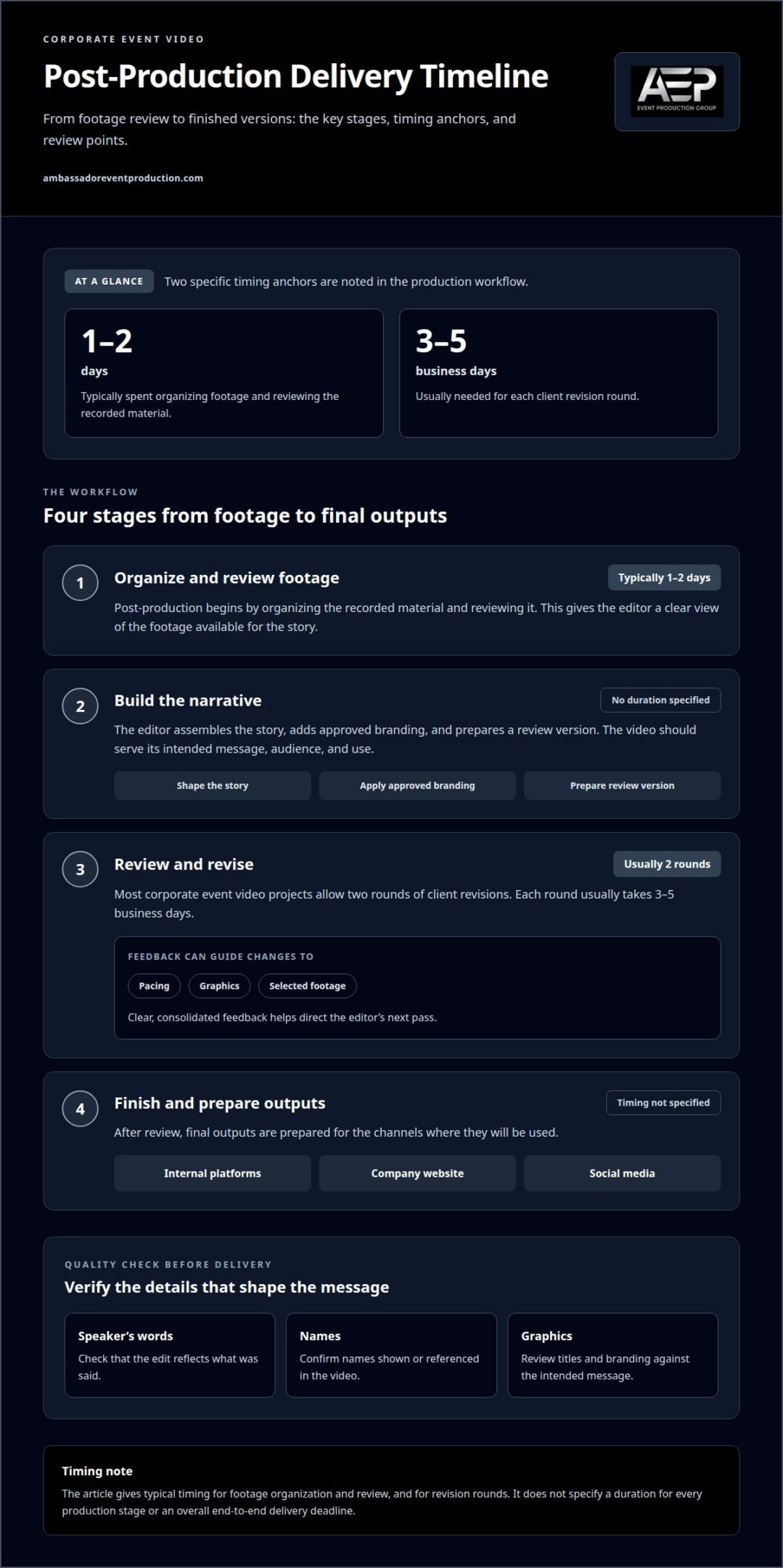
Post-production begins with organizing footage and reviewing the recorded material. For a standard corporate event, this organization and review typically takes 1-2 days. The editor then assembles a narrative, adds approved branding, and prepares a review version so feedback can guide the next pass.
Most corporate event video projects allow two rounds of client revisions. Each revision round usually takes 3-5 business days. Clear, consolidated feedback helps direct changes to pacing, graphics, or selected footage. Final outputs can then be prepared for their planned channels, such as internal platforms, a company website, or social media.
What Is Corporate Event Videography?
Corporate event videography follows a planned workflow: define the message, film key moments, and shape the footage for its audience. Start by deciding what viewers should learn or remember. A conference recap, for example, may combine presentation excerpts with attendee interviews.
Pre-Production Planning
Before filming, establish the video’s purpose and intended audience. A leadership town hall may need a clear record of executive updates, while a product launch may prioritize demonstrations and attendee reactions. Use the event schedule to identify presentations, transitions, and interview opportunities. Rehearsals and a deliverable calendar help coordinate production with speakers and stakeholders.
Planning also maps filming locations and access around the event flow. For video recording and post-production for corporate events, these details guide on-site filming and help the editor shape footage around the intended message.
Shot-List Development
A shot list turns the event schedule into specific footage priorities. For a conference, it might include opening remarks, a wide room view, presentation close-ups, and conversations between attendees. Align each shot with the intended message so the editor has visual material to connect key moments.
On site, the team follows the list while adapting to schedule changes. A delayed speaker, for example, may shift interview timing without sacrificing essential coverage.
Videographer or Production Company
Choose a production approach based on the event’s scope and coordination needs. A freelance videographer may suit a straightforward recording in one location with a defined deliverable. A production company can be a better fit when the plan involves multiple camera positions, live switching, interviews, or coordination across technical elements. Assess the work by the production responsibilities and final content required.
Production pricing depends on factors such as event duration, locations, crew requirements, filming scope, and editing deliverables. The project’s specific needs shape the quote.
For backup planning, the production team can prepare backup recording and audio equipment, identify alternate camera positions, and review the schedule before filming. These steps help address equipment problems, blocked sightlines, or timing changes while protecting key presentations.
Delivery timelines and same-day highlights
Delivery timing depends on the format, footage selected, and review process. One event can produce several different video outputs, so plan early for a quick visual recap, a complete session recording, or both. The intended audience and release channel also determine what needs to be prepared.
Same-Day Highlights
A same-day highlight reel gives attendees a concise view of key moments while the meeting is still underway. A social highlight can be edited to 2 minutes, while a vertical video can run 60 seconds for Reels and Shorts. The production team needs a clear process for selecting footage, applying branded elements, and reviewing the edit. Those decisions help keep the story focused under a short turnaround.
Live streaming lets remote audiences follow an event as it happens. A same-day edit serves a different purpose, packaging selected moments for sharing afterward. Set the audience and destination early, such as social media or a company website, so the format suits its use.
Full-Length Recordings
A full-length recording preserves a keynote, presentation, or meeting for people who couldn’t attend. It can also support on-demand viewing after a conference. A 10-minute recap is a separate format, not a substitute for the complete session. Video recording and post-production for corporate events should therefore distinguish between the full presentation, selected speaker segments, and recap content.
Session length, the number of recordings, and review needs shape the delivery schedule. Organizing sessions by speaker or agenda topic helps viewers find relevant content. Consistent titles and visual formatting make a recording library easier for employees and stakeholders to use.
Event Recap Videos
An event recap selects footage to convey the experience and central message rather than document every moment. It can combine speaker highlights, audience responses, and event visuals—often complemented by branded guest activations like the event photo booths from The Photography Co to capture lively, candid engagement. Short social clips can focus on one speaker or announcement, while a broader recap offers a fuller account. Match each edit to its destination and audience.
Build a delivery calendar around formats, review stages, and planned release channels. Highlights can reach attendees through social media, company websites, or event communications. A concise speaker clip may suit a specific message, while a wider recap can tell a more complete event story.
Plan your event video delivery around the content, audience, and channels you want to serve.
Ambassador Event Production: Video Production Services
Ambassador Event Production provides video production for corporate events, from capturing key sessions to shaping footage into finished videos. Partner with the team when your event needs coordinated filming and post-production, or when sound and lighting must support the recording.
Audio-Visual Technical Support brings video, sound, and event technology together on site. Audio Production Services support clear speech capture, while Lighting Design and Execution creates suitable conditions for presenters and cameras. These services can complement video production for a keynote, conference, or company meeting.
Share your event format, intended audience, and the videos you need to give the production team a clear starting point for discussing coverage and delivery. Contact Ambassador Event Production to discuss your corporate event video.
Give Your Event Video a Clear Purpose
Before production begins, decide what the finished video should help people understand, remember, or do. A clear purpose guides which moments matter and how the final content will serve your organization after the event. This makes video recording and post-production for corporate events part of a broader communications plan, rather than a task that ends when filming stops.
Ambassador Event Production offers Video Production Services, Audio-Visual Technical Support, and Audio Production Services for business events. Bring your event format and intended audience into the conversation, along with the content you hope to create. This gives the team a useful starting point for aligning production with your goals.
Contact Ambassador Event Production to discuss your event video. A thoughtful plan can help your message continue reaching people after the room clears.
Frequently Asked Questions
What types of events do you film?
Corporate events are a core fit, including conferences, town halls, leadership meetings, and product launches. Video coverage can focus on a formal presentation, panel discussion, or attendee interactions, depending on the event’s purpose. For a multi-session conference, set recording priorities around the agenda so each finished video serves its intended audience rather than treating every session the same.
What equipment is needed to record a corporate event professionally?
Professional event recording typically uses cameras, suitable lenses, microphones, lighting, recording equipment, and monitoring tools. The setup depends on the room and intended result: a panel discussion needs clear coverage of each speaker, while a product demonstration may need close views of the item being presented. For a remote audience, streaming equipment and a reliable network connection also matter.
What are the steps in corporate event video post-production?
Post-production generally moves from organizing recorded media to selecting usable takes, assembling the edit, finishing sound and visuals, and preparing the agreed versions. For a conference with several sessions, clear file labels keep speaker names and presentation topics associated with the right footage. A final review can catch details such as misspelled names or an outdated company logo before publication.
How long does corporate event video editing and delivery take?
Timing depends on the amount of footage, the number of finished videos, editing complexity, and review needs. A short event highlight and a full recording of several presentations require different amounts of editing. Same-day delivery also requires content choices and approvals to happen quickly. A delivery calendar that accounts for these steps helps align finished videos with planned announcements or internal sharing.
How do event videographers handle audio, lighting, and live presentations?
Production teams coordinate microphones, room sound, camera positions, and lighting around the presenters and venue. For a panel, each speaker needs to remain audible as the conversation moves between participants. For a presentation with slides, camera exposure and screen visibility need attention together. During a webcast, a separate stream mix can help remote viewers hear speech without room echo or distracting audience-microphone pickup.