
Event Production Contingency Plan: Technical Guide
What if the audio drops just as a keynote begins, or a video feed fails moments before a major reveal? A practical event production contingency plan helps your team respond quickly and keep a technical issue from taking over the audience’s experience.
Sound, screens, lighting, staging, and connectivity can all be affected by live-event problems. The pressure grows when no one knows who can make the call, what to tell presenters, or how to protect the schedule. Preparation doesn’t mean planning for every imaginable problem. It means agreeing on clear responses before they’re needed.
This guide explains how to identify the technical risks most relevant to your event, assign an owner and a trigger to each one, and define a workable recovery action. You’ll also learn how to test fallback options and coordinate audio, video, lighting, staging, and rigging teams so everyone understands their role when conditions change. With a shared plan and clear communication, the production team can make timely decisions and keep the event moving.
Key Takeaways
- Build an event production contingency plan around specific technical risks, response triggers, accountable owners, and recovery actions.
- Prioritize risks by their potential effect on the audience and schedule, and by whether a workable fallback exists.
- Use practical examples to plan responses for audio, video, lighting, and staging, then adapt them to the event’s setup.
- Rehearse key cues and brief scenarios so operators and decision-makers can act confidently when conditions change.
- Coordinate technical disciplines around shared system dependencies and communication so the team can make clear recovery decisions.
Why an Event Production Contingency Plan Protects the Live Experience
An event production contingency plan gives the technical team a shared process for responding when a production system behaves unexpectedly. It documents technical risks, response triggers, assigned owners, and recovery actions to help protect the live experience when conditions change. Instead of stopping at “something might go wrong,” the plan tells the team what to watch for, who takes the lead, and what to do next.
Preparation can’t prevent every outage or equipment problem, but it can reduce uncertainty in the moment. A clear trigger helps the team recognize when to act, while a named owner limits conflicting instructions and delays. For a general overview of contingency planning as part of risk management, see this Contingency Plan Overview.
Which technical failures can disrupt a live event?
Consider failures across connected production systems, not just the equipment closest to the stage. A microphone that cuts out can make a presenter difficult to hear. A playback file that won’t start may interrupt a cue or delay the program. A video signal or display failure can leave parts of the room or remote viewers without essential information. A lighting issue may obscure a speaker, while a power interruption can affect several systems at once. A staging or rigging concern may require activity to pause while the issue is assessed.
These scenarios don’t carry the same likelihood or consequences at every event. Venue infrastructure, event format, technical design, and system dependencies all shape the risk. A presentation relying on a single video source has different exposure from one with a prepared alternative. Assess each issue in context, including its effect on audience understanding, presenter confidence, the schedule, and safety.
What belongs in the plan, and what does not?
Keep the document focused on technical response. Record the systems in use, credible failure modes, warning signs or triggers, the person responsible for the first response, escalation routes, and the agreed recovery action. Include communication cues, such as how the stage team will be told to hold a cue or how a presenter will learn that playback is delayed. Keep instructions brief enough to find and use under pressure.
- Technical scope: Audio, video, playback, lighting, power dependencies, staging, and rigging.
- Response structure: Who assesses the issue, who authorizes a change, and who communicates it to affected people.
- Recovery direction: The planned fallback, the conditions for using it, and when to escalate instead.
Catering, attendee registration, and other event-planning procedures belong in their relevant operational plans, not in this technical response document. The plans still need to work together. Coordinate technical actions with venue procedures and the event’s wider emergency and operational response plan. If a technical issue raises a safety concern, follow the applicable venue and event procedures rather than treating an AV fallback as the whole response. This keeps the production team’s responsibilities clear and helps everyone work from a coherent response.
How to Map Event Production Risks into Clear Response Plans
A useful risk map turns possible problems into a sequence the team can act on. Start by inventorying the systems the show depends on. Then identify how each could fail, assess the consequences, assign an owner, and define a recovery path. This keeps preparation focused on decisions and actions rather than a long catalogue of hypothetical problems.
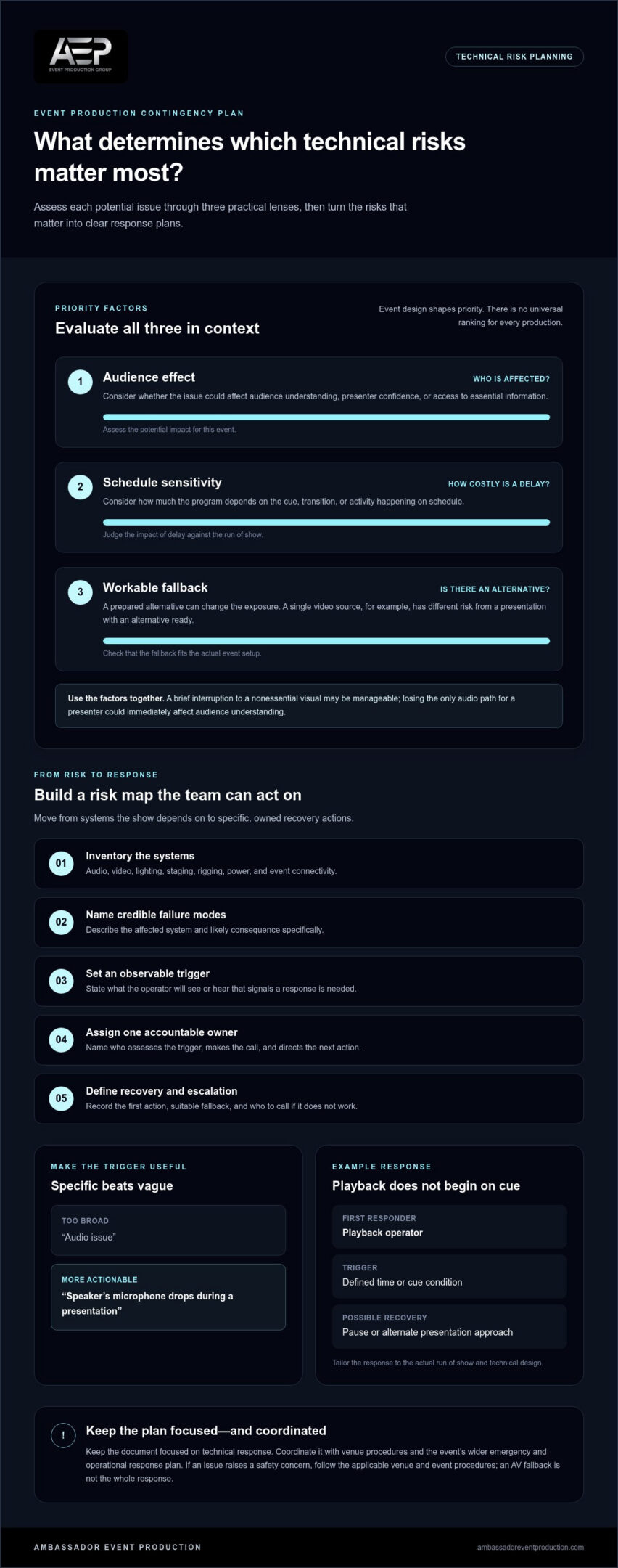
Prioritize each risk with three practical questions: How much could it affect the audience? How sensitive is the schedule to a delay? Is there a workable fallback? A brief interruption to a nonessential visual may be manageable, while losing the only audio path for a presenter could immediately affect audience understanding. Priorities depend on the event design, not just the equipment involved.
Every listed risk needs one accountable response owner so the team knows who can assess the trigger, make the call, and direct the next action. Others may diagnose the issue or support the recovery, but shared responsibility shouldn’t leave the decision unowned.
Build a technical risk register for the event
Group entries by audio, video, lighting, staging, rigging, power, and event connectivity. For each, record the affected system, likely consequence, how the team will detect a problem, and the recovery option. Keep descriptions specific enough to guide action: “speaker’s microphone drops during a presentation” gives the team more direction than “audio issue.”
- Observable trigger: What will the operator see or hear that signals a response is needed?
- First action: What immediate step should happen before the issue escalates?
- Owner and escalation: Who leads, and who is called if the first response doesn’t work?
- Fallback: What alternative suits this event’s setup?
For example, if playback doesn’t begin on cue, the register might name the playback operator as the first responder, set a defined time or cue condition as the trigger, and identify a pause or alternate presentation approach as a possible recovery. Tailor that response to the actual run of show and technical design. Coordinating these details across disciplines is part of effective live event production support.
Assign decision rights before the event begins
Decide who can call a fallback, pause a cue, or escalate an incident, and record those permissions beside the relevant scenario. Where practical, separate technical diagnosis from venue or client-facing communication. An operator can report what has failed, while the designated lead communicates the agreed next step. This helps prevent conflicting instructions over headset or radio.
Use short, plain-language phrases that identify the issue and requested action. For example: “Hold the next video cue. Playback is unavailable. Stand by for the fallback.” Confirm the message was heard, and specify who will give the next instruction. Avoid vague calls such as “We have a problem,” which don’t tell the team what to do.
Once the register is drafted, review it with the people responsible for technical execution and decision-making. A coordinated production team working across technical disciplines can help connect dependencies and align response ownership before the event begins.
Event Production Contingency Plan Examples for Audio, Video, Lighting, and Staging
Examples make an event production contingency plan easier to apply, but no fallback fits every room or production design. Use the scenarios below as prompts, then tailor each trigger, owner, and response to the actual system, cue sequence, and venue. A fallback should be understood by the people responsible for carrying it out, not assumed to work without testing.
Audio and video: protect intelligibility and program continuity
Audio and video issues can interrupt a presentation or prevent people from receiving key information. Map the signal path from source to audience, including playback and any recording or stream elements in scope. Depending on the setup, a recovery might involve an approved alternate signal path, another prepared microphone, or approved backup media. For more context on planning live sound, explore this high-fidelity event audio guide.
| Risk | Warning sign | Response owner | Immediate action | Fallback |
|---|---|---|---|---|
| Microphone or audio signal loss | Presenter becomes difficult to hear or signal drops | Audio lead | Identify the affected source and alert the show lead | Use an approved alternate microphone or signal path, if ready |
| Playback failure | Media doesn’t start or has no sound | Playback operator | Hold the cue and confirm the issue | Use approved backup media or an agreed spoken transition |
| Display or video signal loss | Screen goes blank or source disappears | Video lead | Notify the show lead and pause dependent content | Switch to a tested alternate source or continue without visuals, if appropriate |
| Recording or stream disruption | Feed or recording status indicates interruption | Video or stream lead | Identify whether the issue affects the room, remote audience, or recording | Continue the in-room program or use an approved alternate feed, if available |
| Lighting cue or control interruption | Expected cue doesn’t occur or a look changes unexpectedly | Lighting lead | Hold the next cue and coordinate with the show lead | Use an agreed stable look or adjusted cue sequence |
| Stage-use or rigging concern | Stage area or rigging setup appears affected | Stage or rigging lead | Pause affected activity and escalate through designated procedures | Change stage use only when approved by the responsible leads |
Lighting, staging, and rigging: plan safe technical responses
Lighting cues shape visibility and transitions, so define who can hold or adjust a cue if control is interrupted. For a stage-use change, identify who can pause activity and who communicates the revised direction to presenters. Rigging responses must follow the approved design, venue requirements, and qualified crew direction. Escalate any concern affecting structural safety through the event’s designated safety and venue procedures. For events with a screen or recorded content, a corporate event video guide can also help frame production considerations.
Review each example with the relevant technical leads and adapt it to the event. An alternate source or cue is useful only if it suits the production and the team knows when and how to use it.
How to Rehearse and Communicate an Event Production Contingency Plan
A written response only helps if the people responsible can follow it under live-event pressure. Rehearsing an event production contingency plan gives the team a chance to find unclear instructions, untested assumptions, and communication gaps before they affect the audience. You don’t need to simulate every possible failure. Focus on scenarios that could interrupt the program or require a coordinated decision.
Keep contingency rehearsal distinct from normal program rehearsal, which checks the planned show flow and cues. Then connect the two in the production schedule: confirm when the team will test fallback paths, who needs to be present, and how rehearsal will fit around other work. A short, scenario-based tabletop exercise can test decision-making without changing the live system. For example, walk through who calls a hold, who authorizes the fallback, and who tells the presenter what to expect.
Test triggers, backups, and communication paths
During a technical run-through, check the parts of the response that can be tested safely in the actual setup. Confirm that operators recognize the agreed trigger, can reach the right lead, and understand the cue to use. Where relevant, test approved backup media, alternate signal paths, power arrangements, and access to the controls needed for recovery. Don’t assume a fallback works simply because it appears in the plan.
Record anything the team couldn’t verify, such as a dependency on a system, person, or venue decision. Assign each open item to a responsible person and set a clear follow-up point, such as the next technical check or production review. If an unresolved dependency could affect safety or the approved setup, escalate it through the appropriate venue and event procedures before relying on that response.
Keep the plan usable under live-event pressure
Operators and decision-makers need clear instructions, not a long narrative to search through. Use short action statements, consistent names for systems and roles, and direct escalation language. Make the current version easy for relevant production leads and venue contacts to access, and remove outdated copies that could cause confusion. Brief everyone who needs to act on the plan, including those who authorize changes or communicate them to presenters.
After a test or incident, debrief while the details are fresh. Note what worked, where a cue or handoff was unclear, and what needs to change. Revisit the plan whenever systems, staffing, or program requirements change, and keep it aligned with the current production setup.
- Readiness check: Are triggers observable and response owners clear?
- Fallback check: Have relevant alternatives and communication paths been tested?
- Access check: Can the right leads find and understand the current instructions?
- Alignment check: Does the response follow applicable venue and safety requirements?
Venue procedures and applicable safety requirements take precedence over a production fallback. For coordinated technical production support, Ambassador Event Production brings audio, video, lighting, staging, and rigging together around a shared response approach.
How Integrated Event Production Supports Contingency Readiness
A contingency response rarely stays within one department. A video issue can affect a presenter’s timing, lighting cues, stage movement, and communication with the audience. When the technical team understands those connections before doors open, it can make decisions with the whole production in view instead of solving one problem in a way that creates another.
Coordinate technical systems before doors open
Video, audio, lighting, staging, and rigging have distinct responsibilities, but they intersect in the production design. A presenter’s entrance may depend on a stage cue, a microphone handoff, and a lighting change happening in sequence. Playback may rely on both a video signal and the cue caller’s timing. Mapping these connections helps the team identify which people and systems need to be involved if one part changes.
Before the event, review shared dependencies with the production leads and venue team. Consider cue timing, signal routing, access to control positions, and how operators will communicate if a planned action needs to pause. For instance, if a video cue is delayed, the presenter and lighting operator may need the same clear instruction to hold the next transition. Agreed language and decision paths help keep adjustments coordinated.
Technical oversight brings these disciplines together while keeping each role clear. The production team can collaborate with event and venue teams on the technical setup and its responses, while venue procedures and designated safety direction guide issues outside routine production decisions. An integrated technical event production approach connects these moving parts through a shared understanding of the show and its contingencies.
Turn the contingency plan into a production conversation
Bring the event format, technical priorities, and known constraints into early production discussions. A presentation-heavy program, for example, may depend on clear speech and reliable playback, while a program with frequent stage transitions may place more emphasis on cue coordination and stage access. Sharing priorities helps the technical team focus on the dependencies most likely to affect the audience experience.
Discuss how audio, video, lighting, staging, and rigging will work together, who communicates a change, and how the wider event team will be kept informed. Ambassador Event Production provides integrated technical production for professional events, bringing these disciplines together for production preparation and execution while keeping technical responsibilities distinct from broader event operations.
To begin, write down the event format, the technical moments that matter most, and any known venue or system constraints. Use those points to start a conversation about the production design and its fallback options. A focused review can turn a contingency document into a working part of the technical plan.
Make Technical Readiness Part of Your Next Production Conversation
A contingency plan works best when it grows alongside the production, not when it’s filed away after the first draft. As the program, venue details, or technical priorities take shape, revisit the plan with the people responsible for delivering the show. That keeps response decisions connected to the actual production design.
For your next step, identify the technical moments that matter most to the audience and bring them into an early production discussion. Ambassador Event Production is family-owned and operated, with a history dating to 1955 and integrated video, audio, lighting, staging, and rigging capabilities. Coordinating these disciplines can help your team consider system dependencies and response options together as you shape an event production contingency plan.
Discuss your event’s technical production needs with our team to start planning a coordinated approach. With clear priorities and the right technical partners involved, your team can prepare with confidence.
Frequently Asked Questions
What should an event production contingency plan include?
It should give the team enough information to recognize a technical issue and respond consistently. For each scenario, record the affected system, the observable sign of trouble, the role responsible for assessing it, who can authorize a change, and the next communication step. Include the plan’s version or update date so production leads can distinguish current instructions from outdated notes, especially after a change to the show or technical setup.
How do you make a contingency plan for a live event?
Start with the event’s technical design and walk through the show flow from setup to close. At each important transition, ask what could interrupt the next action and what the team would do if it happened. Document realistic responses, review them with the people expected to act, and check that the instructions fit the venue’s procedures. A final read-through by someone unfamiliar with the draft can reveal unclear terms or missing steps.
What are common technical risks at live events?
Common risks include a microphone or audio feed cutting out, playback failing, a screen losing its source, lighting controls becoming unavailable, or power affecting connected equipment. Events with online components may also face connectivity interruptions that affect a stream or remote presentation. A problem can travel downstream: a delayed media cue, for example, may disrupt a presenter’s timing even if the room’s audio remains clear. Consider dependencies, not just individual devices.
Who is responsible for responding to a technical problem during an event?
The technical lead or designated production decision-maker should coordinate the response, with the operator closest to the affected system reporting what’s happening. Identify in advance who can pause a cue or approve a fallback. Venue communication and audience-facing updates may have separate owners. This division lets technical staff focus on diagnosis while the appropriate lead manages decisions and communication.
How often should an event production contingency plan be tested?
Test it whenever the production setup or response roles change, and include relevant checks in the technical preparation for each event. A change in playback source, control access, crew assignment, or program sequence can make an earlier test less useful. Before doors open, confirm that key cues and agreed recovery paths still match the current setup. Brief tabletop reviews can also help validate decisions without interrupting system operation.
Can an event production contingency plan prevent every technical failure?
No plan can eliminate every failure because equipment, venue conditions, and dependencies can change. Its purpose is to help the team recognize a disruption, limit confusion, and choose a suitable response. A plan is only as dependable as its assumptions, so mark untested alternatives clearly and avoid relying on a fallback that depends on the same source or connection as the primary system.
What is the difference between an event emergency plan and a technical contingency plan?
An event emergency plan addresses broader incidents that may affect people, venue operations, or the event as a whole, including actions directed by venue procedures. A technical contingency plan focuses on production-system disruptions and the decisions needed to maintain or adjust technical delivery. The plans should align, not compete. If a technical issue creates a safety concern, designated emergency and venue procedures take priority over routine production recovery.