
How lighting, video, sound, and planning shape event experiences
A memorable event doesn’t rely on visuals alone. Improving audience experience with better AV means coordinating lighting, sound, and video so they support the message and help people stay connected to it. For corporate events, begin planning AV needs 60-120 days before the event, leaving time to account for the venue and program.
It’s easy to focus on what the audience sees, but clear sound and well-timed transitions matter just as much. When these elements work together, attendees can follow speakers, absorb key ideas, and feel the atmosphere shift with the event.
This article explains how lighting, sound, and visual effects shape a room, how video can strengthen a story, and what helps communication stay clear throughout a venue. You’ll also see how early planning and a venue walkthrough bring those decisions together. The goal is an immersive experience where technology supports the content instead of competing with it.
Key Takeaways
- Coordinate lighting, sound, and visual effects to shape the atmosphere while keeping the event’s message clear.
- Use projections and video purposefully to reinforce a brand story and give presenters visual support.
- Choose audio and visual systems around the venue so attendees can hear speakers and see important content throughout the room.
- Start AV planning early and include a venue walkthrough to align technical decisions with the space and event program.
1. Using lighting, sound, and visual effects to set an event’s atmosphere
In the United States, professional event AV costs depend on the venue, production scope, equipment, and installation needs. Pricing is provided after a quote request. A ballroom keynote may need a different setup than a gala with projections. The venue and technical requirements shape the quote.
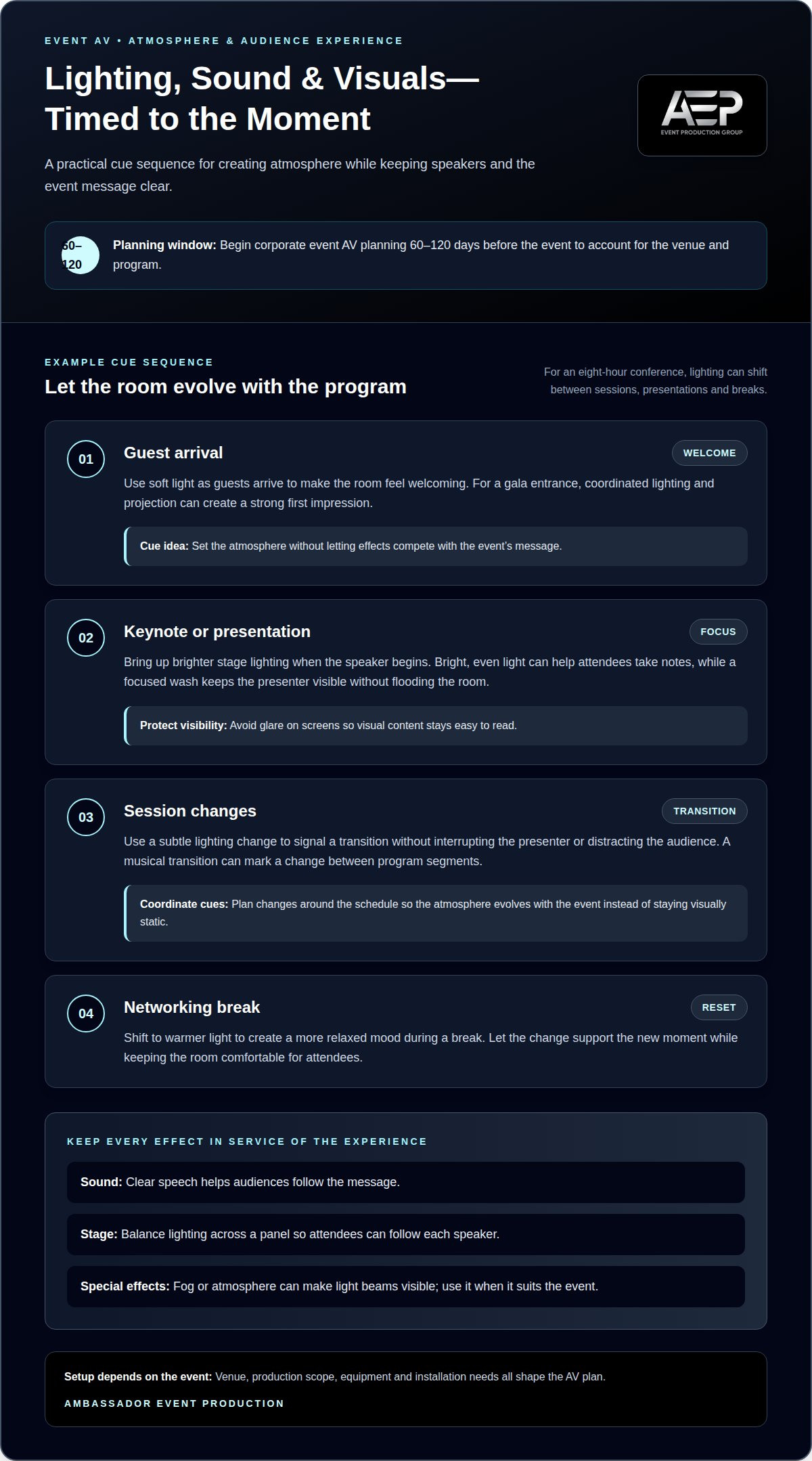
Lighting can make a room feel welcoming, focused, or dramatic. A conference might use soft light as guests arrive, then brighter stage lighting when a speaker begins. Color and intensity can distinguish moments in the program, while a subtle change can signal a transition without interrupting the presenter or distracting the audience.
For a conference lasting eight hours, lighting can shift between sessions, presentations, and breaks. Bright, even light can support note-taking during a keynote, while warmer light can create a more relaxed mood during a networking break. Plan changes around the schedule so the atmosphere evolves with the event instead of staying visually static. When conferences or incentive trips transition into off-site networking events, planners often seek out unique settings—such as sunset sails with Lisbon Catamaran Tours—where natural light and open waters create an effortlessly relaxed environment.
Stage lighting should guide attention to the speaker while keeping the audience comfortable. A focused wash can make the presenter visible without flooding the room with light. For a panel discussion, balanced lighting across the stage helps attendees follow each speaker. Avoiding glare on screens also keeps visual content easy to read.
Sound and visual effects add another layer to a room’s atmosphere. Clear speech helps audiences follow the message, while a musical transition can mark a change between segments. At a gala entrance, coordinated lighting and projection can create a strong first impression. Fog or atmosphere can make light beams visible, adding drama when it suits the event. Improving audience experience with better AV means choosing effects that support the moment, not compete with it. Beyond indoor corporate stages, rich sensory immersion is also the hallmark of world-renowned live cultural events; for organizers and travelers seeking inspiration from vibrant traditional gatherings, bestofpng.com offers curated tour packages to famous spectacles such as the Mount Hagen and Goroka Shows.
The cost varies with the venue, production scope, equipment, and installation requirements. A quote is provided after a request.
2. Using projections and video to tell a brand story
A brand story works best when each visual element supports the same message. For a product launch, opening footage might establish the problem, while presentation slides introduce the solution. Consistent colors, imagery, and transitions connect those moments, giving the audience a clear thread to follow instead of a series of unrelated visuals.
Screen size and projector brightness depend on the venue’s dimensions, audience sightlines, ambient light, and content. A room with daylight or wide seating needs different display choices than a dim, compact space. Text-heavy presentations also need images that remain clear and readable from seats throughout the room.
LED video walls can keep presentations visible while creating a strong visual centerpiece. Video switching lets an operator move between a live camera, presentation slides, and prerecorded content as the program changes. IMAG, or image magnification, displays live footage of speakers, helping attendees see facial expressions when the stage is distant.
Projection walls and LED displays can also shape the stage itself. For a product reveal, projected imagery might extend the presentation’s visual identity across a backdrop. LED walls paired with responsive physical set pieces can create a dynamic stage, while keeping the speaker and key content easy to see. Each visual choice should clarify the story, not compete for attention.
Between sessions, a short video or music bed can make transitions feel intentional. A conference might display event highlights as attendees return to their seats, then switch to the next speaker’s title slide. Coordinated cues prevent blank screens and help the program maintain its pace.
For events where original brand footage supports the message, event video production can help shape content for the screen and program.
At trade fairs and exhibitions, projections and videos can tell the story of a brand or product, while displays and projections can present relevant information about products or services. Presenters can use screens and projections to support and complement their speeches, giving audiences another way to follow key points. Animated logos, backgrounds, transitions, and IMAG can help keep an audience interested in the content. An LED video wall can also display attendees’ tweets, pictures, and instant messages to encourage interaction.
3. Audio and visual systems for clear communication
Clear speech depends on a sound system suited to the venue, not simply louder speakers. A professional system should distribute sound evenly so attendees at the front and back can follow the same presentation. An audio operator can balance microphones and playback levels as speakers change, keeping the message clear and limiting sudden volume shifts.
Choose speakers and microphones to suit the room’s size, layout, and program. A wireless microphone lets a presenter move beyond the podium, while lavalier microphones can help panelists speak without passing a microphone around. Essential event AV may include speakers, microphones, an audio console, and screens selected to match the venue and content.
To improve sound quality and reduce echo, consider how the room’s surfaces reflect speech and where speakers point. A technical setup can distribute speakers across the space instead of directing all sound from the stage. During rehearsal, listen from different audience areas and adjust microphone levels, speaker direction, and placement where speech is unclear.
Accessibility also belongs in the communication plan. Captions can display spoken content on screens, while assistive listening options can give attendees more direct access to audio. Include these supports in the production plan and test them alongside microphones and presentation visuals.
Visual support matters across the room, too. At a conference, attendees sitting 100 feet from the stage should still be able to see the speaker’s facial expressions. Screens can show a close view alongside presentation slides, helping people follow both the presenter and key details. Keep text legible and avoid placing essential information where speakers or stage elements block it.
Clear communication depends on coordinating the room’s speakers, microphones, screens, and operating cues. A rehearsal that checks speech from several seating areas can reveal problems before attendees arrive.
Choose a system for the venue rather than treating it as a standard package. Digital audio consoles can support event sound, but the overall system should suit the space. This keeps equipment decisions aligned with where communication will take place.
For business events, professional sound systems should provide even coverage across the venue. Screens and sound systems help audiences see and hear speakers clearly, supporting communication throughout the room.
4. Early AV planning and venue walkthroughs
Begin corporate AV planning 60-120 days before the event. This gives the production team time to align technical choices with the venue, program, and audience needs. For a product launch, map the reveal, speaker cues, video playback, and room reset early. These decisions connect engagement goals to the event schedule.
A venue walkthrough turns a floor plan into a practical production plan. Walk the entrance, stage, seating area, control position, and loading route. Note sightlines, available power, ambient light, and cable paths. For example, a pillar blocking a screen from side seating may affect display placement or stage design.
Next, match technical cues to the run of show. Identify who calls each presentation, microphone handoff, video, and lighting change. Prepare presentation files and test microphones and video before doors open. Individual production delays may last a minute, so planned transitions help protect the program’s pace and first impression.
Renting or buying AV equipment depends on how often a venue uses it and its ongoing needs. Buying may suit a fixed setup used repeatedly, while renting can fit events with changing technical requirements. Consider storage, maintenance, staffing, and equipment updates alongside the purchase decision.
In the United States, plan safety, electrical, and accessibility reviews around venue procedures and applicable local requirements. During the walkthrough, identify power access, secure cable routes, and clear accessible paths. Include caption visibility and assistive listening in the room plan so these supports work from audience seating.
For a virtual audience, test internet connectivity alongside the in-room program. Confirm camera views, audio feeds, screen content, and presenter transitions during a technical rehearsal. Have a contingency plan for mission-critical equipment, such as an alternate playback source, ready before the event.
Bring your event schedule and venue details into a coordinated plan with event production support.
Ambassador Event Production
Ambassador Event Production brings lighting, sound, and video together around your event’s message. Turn to the team when you need technical production to connect the program, venue, and audience experience, from pre-production through show execution.
Video Production Services, Audio Production Services, Lighting Design and Execution, and Audio-Visual Technical Support bring the technical elements together. The team can shape visuals to complement presentations, plan audio for clear communication, and align lighting with the atmosphere and schedule. The right mix depends on the event’s format, content, and venue.
Share your event goals and production needs with Ambassador Event Production to discuss how the technical elements can work together. Contact the team to start planning your event’s production.
Shape your next event with intention
Set a clear production goal for your next event before choosing technical details. Decide what attendees should notice, understand, or feel at each key moment, then use that goal to guide creative and operational choices. This keeps improving audience experience with better AV tied to the event’s purpose instead of adding effects for their own sake.
Ambassador Event Production connects that purpose to the production plan through Video Production Services, Audio-Visual Technical Support, and Audio Production Services. Share the event format, key messages, and moments that matter most to start shaping a coordinated approach with the team.
Contact Ambassador Event Production to discuss your upcoming event. A considered plan gives your message room to land and your audience a reason to stay engaged.
Frequently Asked Questions
How does better AV improve audience engagement and experience?
Better AV helps attendees stay connected to the program by making content easier to follow and participation easier to navigate. For example, a moderator can invite audience questions and display selected responses on screen, linking discussion to the presentation. Clear cues between segments also show people what’s happening next, so they can focus on the event instead of working out how to participate.
What are the steps to plan and install an audience-focused AV system?
Start by defining what attendees should see, hear, and do at key moments, such as asking questions during a panel. Turn those needs into a production plan that coordinates screens, audio, and interaction points with the event flow. Align setup with the venue and program, prepare content for the chosen displays, and rehearse audience-facing cues so each element works as intended.