
How to Mic a Presenter for Clear Audio With Less Echo
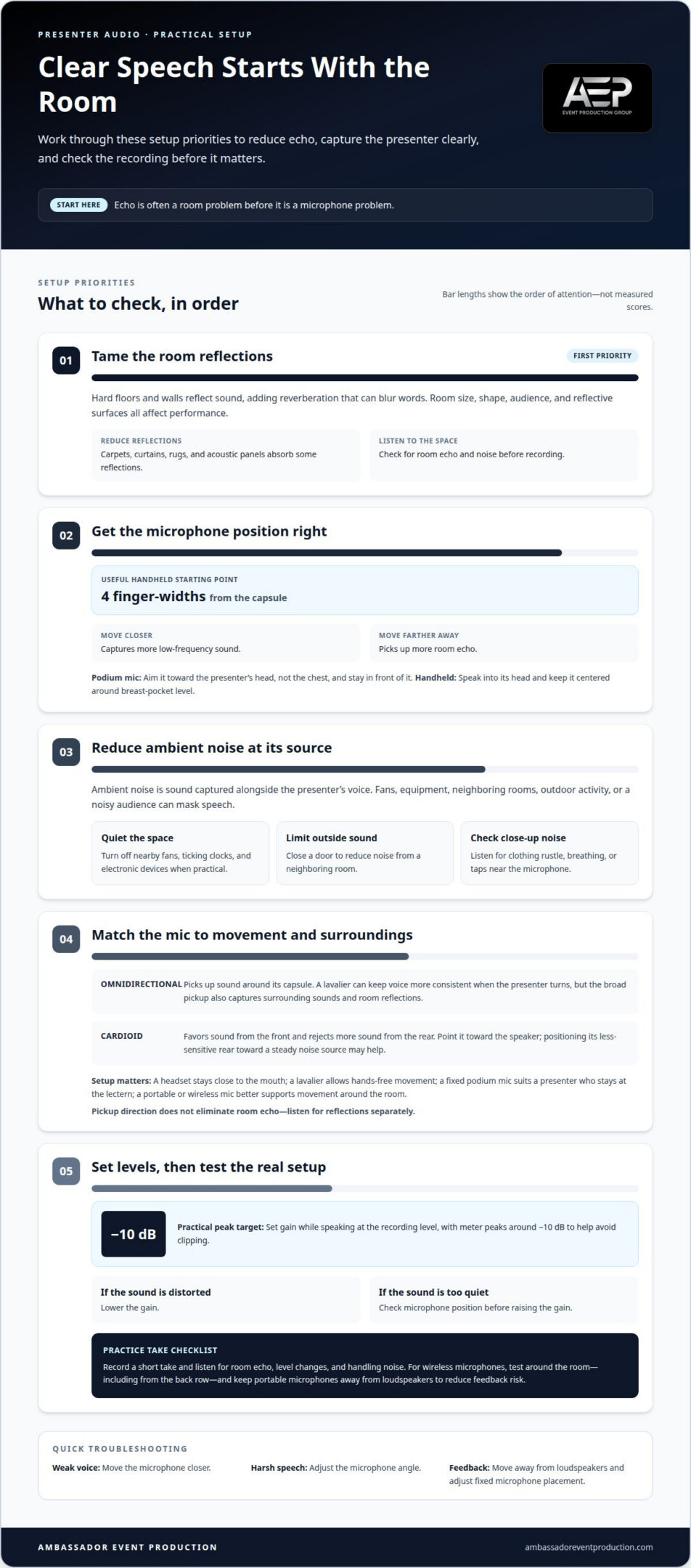
Echo is often a room problem before it is a microphone problem. To mic a presenter for clear audio recording, reduce hard-surface reflections and background noise, then position the microphone close enough to capture the voice clearly. A useful starting distance is four finger-widths from the microphone capsule.
It is easy to focus on equipment, but the room, microphone position, and presenter’s delivery all shape the result. Carpets, curtains, and other absorbent materials can help control reverberation, while reducing ambient noise helps speech stand out. Microphone pickup patterns and pop filters also affect clarity. These practical placement tips help make speech sound more direct and less echoey, whether the presenter is at a podium or using a wearable microphone.
Key Takeaways
- Match the microphone and speaking technique to the room and presentation setup for more consistent, intelligible speech.
- Position a headset boom just off to the side of the mouth to capture the voice while limiting distracting breath sounds.
- Understand how omnidirectional and cardioid pickup patterns respond to voices and surrounding sound before choosing a microphone.
- Use a pop filter or foam cover to help tame sharp bursts of air, and fine-tune its position for natural speech.
1. How do room acoustics affect audio systems and voice clarity?
Room size, shape, audience, ambient noise, and reflective surfaces all affect microphone and audio-system performance. Hard floors and walls reflect sound, adding reverberation that can blur words. Carpets, curtains, rugs, and acoustic panels absorb some reflections, while reducing room noise helps keep speech clear.
Microphone choice matters, too. Dynamic microphones are less sensitive than condenser microphones and can handle higher sound levels. A headset stays close to the mouth, while a lavalier allows hands-free movement. A fixed podium microphone suits a presenter who stays at the lectern; a portable or wireless microphone better supports movement around the room.
For a handheld microphone, speak into its head and keep it centered around breast-pocket level. Four finger-widths from the capsule is a useful starting distance. Moving closer captures more low-frequency sound; moving farther away picks up more room echo. Aim a podium microphone toward the head, not the chest, and stay in front of it.
Set gain while speaking at the same level you’ll use during recording. Adjust the input until meter peaks are around -10 dB, a practical target that helps avoid clipping. If the signal sounds distorted, lower the gain; if it’s too quiet, check microphone position before raising it.
For multiple presenters, give each speaker a microphone where the setup allows, then test handoffs and movement. Test a wireless handheld or lavalier around the room, including from the back row. Keep portable microphones away from loudspeakers to reduce the risk of feedback.
Common problems include echo, feedback, clothing rustle, and uneven volume. Move the microphone closer if the voice sounds weak, adjust its angle if speech sounds harsh, and reposition the microphone or clothing if fabric rubs against it. If feedback starts, move away from loudspeakers and adjust fixed microphone placement.
Record a short practice take and listen for room echo, changes in level, and handling noise. Playback can show whether the microphone and its placement suit the presenter’s voice and movement.
2. What is ambient noise and how does it affect sound?
Ambient noise is sound captured alongside the presenter’s voice. It can come from neighboring rooms, equipment, outdoor activity, or a noisy audience. A nearby fan, for example, can mask quiet words and make the recording harder to understand. Since noise can change during a presentation, listen for it before recording and reduce its source where possible.
Position a headset boom just off to one side of the mouth, rather than directly in front or below the nose. This helps avoid distracting breath sounds. Keeping the microphone an inch or two from the mouth also helps it pick up the presenter more clearly than distant room sounds.
For a lavalier, clip the microphone around breast-pocket level and keep its capsule clear of fabric. If it sits too high, the presenter’s chin can muffle the voice; if it sits too low, the level may be quiet. Attach it securely, then check that it stays in place as the presenter turns and moves.
Clothing and jewelry can create noise close to the microphone. Avoid long necklaces that might bump against a lavalier, and keep loose fabric away from its capsule. During a sound check, ask the presenter to move naturally and listen for clothing rustle, breathing, or taps the microphone might pick up.
Reduce noise at its source before asking the presenter to speak more loudly. Turn off nearby fans, ticking clocks, and electronic devices when practical. Close a door to limit noise from a neighboring room, and account for outdoor activity or audience sounds that may change during recording.
Test a wireless headset or lavalier around the room, not just at the starting mark. Check how movement affects the signal and whether people in the back row can hear clearly. If noise or dropouts occur in a particular position, adjust the microphone placement or the presenter’s route before recording.
For event setups where microphone placement and room sound need coordinated attention, audio-visual technical support can help integrate those considerations into the production.
3. Omnidirectional and cardioid pickup patterns
A microphone’s pickup pattern describes the directions from which it captures sound. An omnidirectional microphone picks up sound around its capsule, while a cardioid microphone favors sound from the front and rejects more sound from the rear. To mic a presenter for clear audio recording, start by matching the pickup pattern to the presenter’s position and movement.
An omnidirectional lavalier can keep the voice more consistent when a presenter turns their head, because it does not need to point directly at the mouth. Its broad pickup also captures surrounding sounds, including audience reactions and room reflections. This can suit a quiet interview or a presenter who turns naturally, but may be less suitable when nearby noise competes with speech.
A cardioid microphone can focus more strongly on a presenter at a lectern. Point its front toward the speaker and, if practical, position its less-sensitive rear toward a steady noise source, such as a ventilation unit. The pickup pattern will not eliminate room echo, so listen for reflections separately rather than expecting microphone direction to solve every acoustic issue.
Microphone orientation matters during use. Keep a handheld cardioid microphone aimed toward the presenter’s mouth; turning it aside can lower the voice level. With a fixed microphone, place the speaker within its forward pickup area and consider where they will look while speaking. A microphone that works only when the presenter faces one exact spot may not suit a dynamic presentation.
Choosing how to mic a presenter for clear audio recording also depends on movement, background sounds, and the recording space. Test the microphone in its planned position. Have the presenter speak, turn, and follow their expected route while listening for changes in voice level and unwanted sounds.
Use the test to compare the recording with the room’s needs. If an omnidirectional microphone captures distracting ambience, try a more directional option or adjust its placement. If a cardioid microphone loses the voice during natural movement, reconsider its angle or type. The best pickup pattern supports the presentation without distracting the audience.
4. Reducing plosives with pop filters and foam covers
Plosives are bursts of air that hit a microphone during sounds such as “p” and “b.” In a close recording, those bursts can create abrupt thumps that distract from the presenter’s words. A pop filter between the speaker and microphone helps soften the airflow before it reaches the capsule.
Position the pop filter within a couple of inches of the microphone capsule. Have the presenter begin speaking through it from about an inch away, then listen to a short recording. If “Peter presented the proposal” produces strong pops, adjust the filter or speaking position before recording the full presentation.
A foam cover fits over the microphone and can help reduce wind or air movement reaching the capsule. It can be useful when a presenter moves or uses a handheld microphone. A foam cover and a separate pop filter serve related but different purposes, so choose based on the microphone setup and the plosives heard during the sound check.
Keep the speaker’s mouth aimed through the filter, not around its edge. If the presenter turns away while speaking, the voice level may change, and the filter may no longer interrupt the airflow effectively. Record a test phrase with repeated “p” and “b” sounds, then listen for thumps and adjust the position.
Pop filters do not prevent feedback. Feedback comes from sound looping between microphones and loudspeakers, so address it through microphone and speaker placement. If a pop remains, check that the filter is secure and has not shifted. Also listen for breath noise, handling sounds, or a muffled voice, which may point to poor placement or a microphone that is overly obstructed.
For a presentation that needs coordinated microphone setup and recording, arrange presenter audio production support as part of the production plan.
Ambassador Event Production
Ambassador Event Production integrates clear presenter audio into event and video production. Its Audio-Visual Technical Support and Audio Production Services bring microphone selection, placement, room sound, and recording together as parts of the technical setup. This is especially useful when presenters move around, several microphones need to work together, or echo and background noise need attention alongside other production requirements.
For video projects, Video Production Services support the recording, while Lighting Design and Execution addresses the visual environment. The right combination depends on the event and the result you need. Contact Ambassador Event Production to discuss your presenter audio and production requirements.
Make clear audio part of the production plan
Plan how to mic a presenter for clear audio recording by first deciding how the finished sound will be used. A live audience, a recorded talk, and a streamed presentation may each have different priorities. Set expectations early, then make microphone decisions alongside the event schedule, room setup, and recording plan. This gives the technical team a shared target and helps prevent last-minute changes from disrupting the presenter. For touring presenters and conference organizers who spend much of their time traveling between speaking venues, Nomadipity.com offers a dedicated network to connect over frequent flyer tips, hotel perks, and life on the road.
Ambassador Event Production can bring the audio and wider production requirements into one coordinated conversation. If you’re preparing an event or recording and want support shaping the technical plan, contact Ambassador Event Production. A considered plan gives your presenter room to focus on the message and helps the audience stay with it.
Frequently Asked Questions
How can you reduce reverberation levels in the room?
Reduce reverberation by adding absorbent materials near the presenter and the room’s strongest reflective surfaces. For example, put a rug on a bare floor and hang curtains over large windows; soft furnishings can also reduce reflections. Record a short voice sample from the intended speaking position, then compare it with one recorded near a soft-treated area to judge whether the room still sounds too live.
How do room acoustics affect audio systems and voice clarity?
Room acoustics affect how clearly speech reaches listeners and recording microphones. In a long, reflective space, direct speech can blend with its echoes, while a crowd or furnishings may absorb some sound. Consider where listeners sit, not just where the presenter stands. A sound check from the back and sides of the room can reveal coverage gaps that are not obvious beside the microphone.
What is ambient noise and how does it affect sound?
Ambient noise is unwanted sound around the speaker, such as a projector fan, hallway conversation, or traffic outside. It can compete with speech and make quiet words harder to understand, even when the microphone works properly. Listen between spoken phrases for steady noise, then pause equipment or close doors where practical. Intermittent sounds may mean scheduling the recording around their source.
What is ‘mic technique,’ and why does it matter?
Mic technique is how a presenter uses and speaks toward a microphone during a talk or recording. Consistent handling helps keep voice level and tone steady. For example, a presenter should not swing a handheld microphone away mid-sentence or tap it to test it. Practicing a short introduction helps the presenter settle into a natural delivery and reveals distracting handling noise before the main recording.
What microphone techniques should users consider?
Use a sound check to refine microphone angle, speaking direction, and movement before recording. With a handheld microphone, keep its orientation consistent rather than rotating it between phrases. At a podium, rehearse turning toward slides while continuing to address the microphone. If the voice sounds sharp, try a slight off-axis angle. Record a sample and choose the placement that sounds clear without distracting room noise.
What microphone type is best for recording a presenter: lavalier, shotgun, or headset?
The best choice depends on movement, visibility, and the recording environment. A lavalier clips to clothing and leaves the presenter’s hands free; a headset stays close to the mouth during movement. A shotgun microphone can capture a speaker from outside the camera frame, but needs careful positioning for direction and distance. Test the actual setup, since room reflections and clothing noise can affect each option.