
How to Turn Live Event Sessions Into On-Demand Content
A live event can continue serving its audience after the final session ends. Creating on-demand content from a live event means turning recorded sessions and related materials into resources people can access later, such as full videos, short clips, presentations, and interviews.
Once you see the value in recording a session, the next step is making that recording useful beyond a replay. A long video may not suit every viewer, so editing, organizing, and presenting the material clearly helps people find the ideas they need and engage at their own pace.
This guide explains what on-demand B2B event content can include and how to repurpose live recordings into practical resources. You’ll learn how to shape sessions for later viewing, make key moments easier to discover, and extend the reach of your event with content that continues to support your audience.
Key Takeaways
- Shape recordings for later viewing by trimming distractions and helping viewers jump to the moments they need.
- Turn conference and training sessions into formats suited to different audiences, from concise clips to searchable written recaps.
- Extend an event’s reach by sharing relevant sessions through email and social channels after the live program ends.
- Use viewing and engagement signals to identify which topics resonate and guide future content choices.
Event recordings and other on-demand materials
Recorded sessions are the starting point, not the whole library. Turn each webinar into useful material viewers can find, watch, and revisit.
-
Prepare recording equipment and software
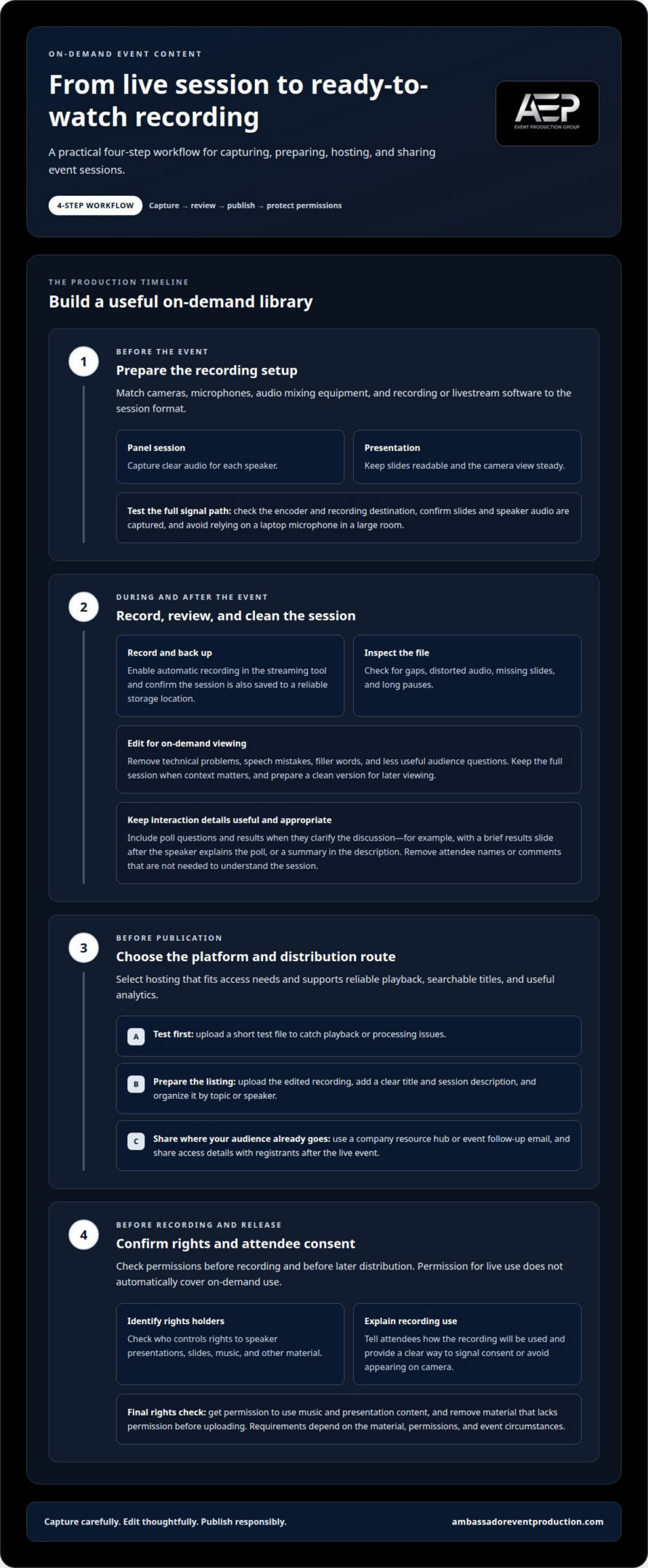
Choose cameras, microphones, audio mixing equipment, and recording or livestream software to suit the session format. A panel needs clear audio for each speaker, while a presentation needs readable slides and a steady camera view. Test the full signal path before the event, including the encoder and recording destination. Confirm that the software captures both the presentation and speaker audio, and don’t rely on a laptop microphone in a large room.
-
Record and store livestreamed sessions
Enable automatic recording in the streaming tool, then confirm the session is also saved to a reliable storage location. After the event, review the file for gaps, distorted audio, missing slides, and long pauses. Recordings can retain technical problems, speech mistakes, filler words, and less useful audience questions, so edit those moments before publishing. Keep the full session when context matters, and prepare a clean version for on-demand viewing.
Include poll questions and survey results when they clarify the discussion. For example, add a brief results slide after the speaker explains the poll, or summarize the findings in the description. Remove attendee names or comments when they aren’t needed to understand the session.
-
Choose hosting and distribution platforms
Choose a hosting platform that meets your access needs and supports reliable playback, searchable titles, and useful analytics. Distribute recordings through channels your audience already uses, such as a company resource hub or event follow-up email. The right platform makes the recording easy to access while giving your team useful viewing data. Upload a short test file first to catch playback or processing issues before the full webinar goes live.
After testing, upload the edited recording, add a clear title and session description, and organize it by topic or speaker. Share access details with registrants after the live event.
-
Address recording rights and attendee consent
Before recording, identify who controls the rights to speaker presentations, slides, music, and other material. Get permission to use music and presentation content, and tell attendees how the recording will be used. Provide a clear way to signal consent or avoid appearing on camera. Requirements depend on the material, permissions, and event circumstances, so don’t assume permission for live use also covers later distribution. Remove material that lacks permission before uploading.
Repurposing conference and training sessions
One conference session can serve different needs when you reshape its central idea for each format. Match the material to the audience, platform, and purpose before publishing.
-
Adapt sessions into multiple formats
Start with the session’s central takeaway, then build formats around it. A conference keynote can become a full replay, a written summary, quote cards, and topic-based clips. For training, create a concise walkthrough alongside the complete recording. Make each version useful on its own, and ensure edits preserve the speaker’s meaning. Avoid splitting content so much that examples lose context.
- Turn webinar and training material into resources people can use again. Divide a product demonstration into sections for setup, key features, and common workflows. A recorded webinar can also support internal training when its examples remain relevant to employees. Add a short introduction explaining who each resource serves and what viewers will learn. Separate audience-facing content from internal material before hosting either version.
-
Share short clips across channels
Choose brief moments that make sense without the full session, such as a speaker explaining one practical idea. Add captions and a descriptive title, then adapt the framing to each social media platform. Include enough context for viewers to understand the point, and direct interested audiences to the complete session. Don’t publish a clip that depends on slides or earlier remarks viewers can’t see.
- Keep webinar content current by reviewing its examples, links, and recommendations before promoting it again. Replace outdated details or add a brief update explaining what has changed. Registration pages and follow-up emails should accurately describe the recording, including whether it is a replay or contains refreshed material. Review viewing analytics to see which sessions attract attention, then prioritize useful updates rather than reposting every recording equally.
Strong source footage gives every format a clearer foundation. For polished event recordings, consider professional event video production.
On-demand content’s reach beyond live attendance
Measure engagement through views, comments, downloads, and viewing time, then compare those metrics with your event goals. To assess return on investment, connect content activity with outcomes such as follow-up requests or registrations. Don’t treat views alone as proof of business impact.
- Set a baseline before distributing each recorded presentation. Track registrations, live attendees, and later views separately to see the recording’s additional reach. For example, compare on-demand views with the session’s live attendance. Keep the measurement period and platform consistent when reviewing performance over time.
- Use available attendee data to make follow-up relevant. Group viewers by sessions watched, topics selected, or questions submitted, then share material that matches their interests. Someone who watched a product demonstration may value a related recap, while a viewer interested in leadership may prefer another presentation on that theme. Handle attendee information responsibly.
- Send useful follow-up after the event instead of a generic replay notice. Include the session title, a short description, and a direct way to access the recording. If a viewer watched only part of a discussion, point them to the relevant topic or speaker. Repurposing a key quote or clip for an email can extend its reach beyond the original attendees.
- Review engagement metrics together, not in isolation. Views show reach, viewing time indicates whether people stayed, and comments or downloads can reveal stronger interest. Compare these signals with your intended outcome, such as continued discussion or follow-up conversations. Use the results to decide which sessions deserve more promotion and which need clearer titles, shorter edits, or different distribution.
- Use attendee responses to guide the next distribution step. If a recorded session prompts questions, share a follow-up summary that addresses them. If a topic earns repeat views or downloads, feature it in a relevant email or event resource collection. This practical cycle connects audience signals with useful content, extending a session’s value without assuming every view reflects the same level of interest.
Definition of on-demand B2B event content
On-demand B2B event content is material people can access after a live session ends. It may include recordings, presentations, interviews, transcripts, and related resources, organized to help an audience learn or revisit a topic.
- Start by deciding what viewers should be able to do after the event. Creating on-demand content from a live event means preparing material for later access, not simply saving a file. A virtual conference replay, for example, can help a colleague who missed a session catch up at a convenient time.
- Distinguish a raw recording from a resource designed for viewing. Add a clear title, brief description, and structure that explains what the session covers. Chapters or topic labels let viewers select relevant sections. For a product presentation, labels such as “setup,” “use cases,” and “questions” make the recording easier to navigate.
- Decide whether a resource is evergreen or time-sensitive. A session about a lasting business skill may remain useful, while details about a product release can become outdated. For instance, educational webinars hosted by professional advisors like The Modern Medicare Agency often focus on year-specific plan options that must be refreshed as guidelines shift. Include context, such as the event or presentation date, when it helps viewers assess relevance. Review time-sensitive details before sharing the material again.
- Make recordings easier to use with captions and transcripts. Add synchronized captions, then provide a transcript viewers can read or search. Review speaker names and technical terms, especially when a panel includes several presenters. Place the transcript near the recording so viewers can choose the format that suits them.
- Organize the collection around how your audience searches. Teams creating on-demand content from a live event can group resources by topic, event, speaker, or session type. Use consistent labels throughout the library. For example, a virtual event collection might separate leadership discussions from technical workshops, helping viewers find relevant sessions later.
Plan the recording and presentation format with event video production support to create material suited to later viewing.
Ambassador Event Production
Ambassador Event Production supports the technical side of event recordings, from the live session through on-demand use. Turn to the team when a conference or business event needs coordinated video, clear audio, and lighting that supports the speakers and presentation.
Video Production Services can capture sessions for later viewing, while Audio-Visual Technical Support and Audio Production Services support the event’s technical delivery. Lighting Design and Execution can help create a clear, professional on-camera presentation. Coordinating these elements helps produce recordings that are easier to edit and repurpose after the event.
Share the event format, the sessions you want recorded, and how you plan to use the material. Contact Ambassador Event Production to discuss your event.
Give Your Event Ideas a Longer Life
Choose an upcoming event session and decide how it should serve people after the live program. Creating on-demand content from a live event involves more than saving a recording; it means shaping a resource around what viewers need to learn, revisit, or share. A clear purpose can guide capture, editing, and presentation decisions before the event begins.
Bring your priorities into the production conversation early. Ambassador Event Production supports the technical work behind event recordings, including video, audio, and audiovisual delivery. Coordinating these elements connects the live session with the material you plan to publish afterward, while keeping the speaker and message at the center.
Whether you’re preparing a single presentation or planning a broader event library, a thoughtful production approach gives your team a practical starting point. Contact Ambassador Event Production to discuss your event and its on-demand goals. Your next session can keep informing audiences well beyond its live audience.
Frequently Asked Questions
What is On-Demand Content and Why is it Relevant?
On-demand content is event material people can access at a time that suits them, rather than during a scheduled session. Just as internet television platforms like Edge IPTV give viewers flexible access to media over the web, on-demand event content allows audiences to view sessions outside of scheduled programming. For B2B audiences, it can help colleagues who weren’t at the event review the same ideas and share them internally. A product discussion, for example, can support a later team conversation without requiring everyone to attend live.
How do you turn a live event into on-demand content?
Choose the sessions that best serve your audience, then plan how each will be captured and used. For a conference with parallel tracks, prioritize sessions that answer recurring customer or employee questions. After the event, prepare the selected recordings for their intended viewers, organize them in a useful collection, and share them through relevant communication channels.
What is the workflow for editing and publishing event recordings on demand?
Use a practical workflow: preserve the original recording, edit a separate copy, review the finished version, then prepare its title and description. Assign someone to approve the final file and publishing details. Before announcing it, open the published page as a viewer and confirm the correct session appears with the intended access settings.
How can live event recordings be repurposed into clips, highlights, and transcripts?
Choose moments that communicate a complete idea, not just a striking sentence. Pair each clip with a short context line, and use a transcript to find useful passages or prepare a written recap. For example, a panel discussion can yield separate highlights for different audience roles. Review each excerpt to ensure it doesn’t imply a claim the full discussion didn’t make.
What are common technical and production risks when recording a live event?
Problems can arise when the recording feed differs from what attendees see or hear in the room. A speaker’s microphone may reach the audience but not the recording mix, and slides may appear too small in the captured frame. Assign someone to monitor the recorded output during the session, and confirm each speaker, presentation, and program transition is captured as intended.