
Live Video Feed Integration for On-Site and Remote Audiences
A well-planned control room brings in-person and remote audiences into the same conversation. Integrating live video feeds for hybrid audiences means bringing camera, presentation, and remote-speaker sources together, then sending a clear program feed online while keeping venue audio separate. A moderator can combine questions from both audiences in one queue so neither group is left out.
Cameras and streaming are only part of a connected experience. Audio routing, reliable internet, and a run of show that makes room for remote participation matter just as much. Every element needs to work together, whether the event uses one shared stage or separate experiences for in-person and virtual attendees.
This guide explains how to connect on-site and remote participants, choose AV equipment for the format, and manage multiple live feeds. It also covers what to test before event day and how production support can coordinate the technical details.
Key Takeaways
- Choose a hybrid format around the event’s goals and the experience you want to create for both audiences.
- Assess the venue, network, platform, and audience access needs before deciding on the technical setup.
- Centralize audio and video in a production control room, and route a clean, separate mix to the stream.
- Bring in remote questions and participation through a moderated process that fits the event schedule.
- Match cameras, microphones, switchers, and encoders to the production format, then test the full signal path before event day.
What Types of Events Are Suitable for Hybrid Production?
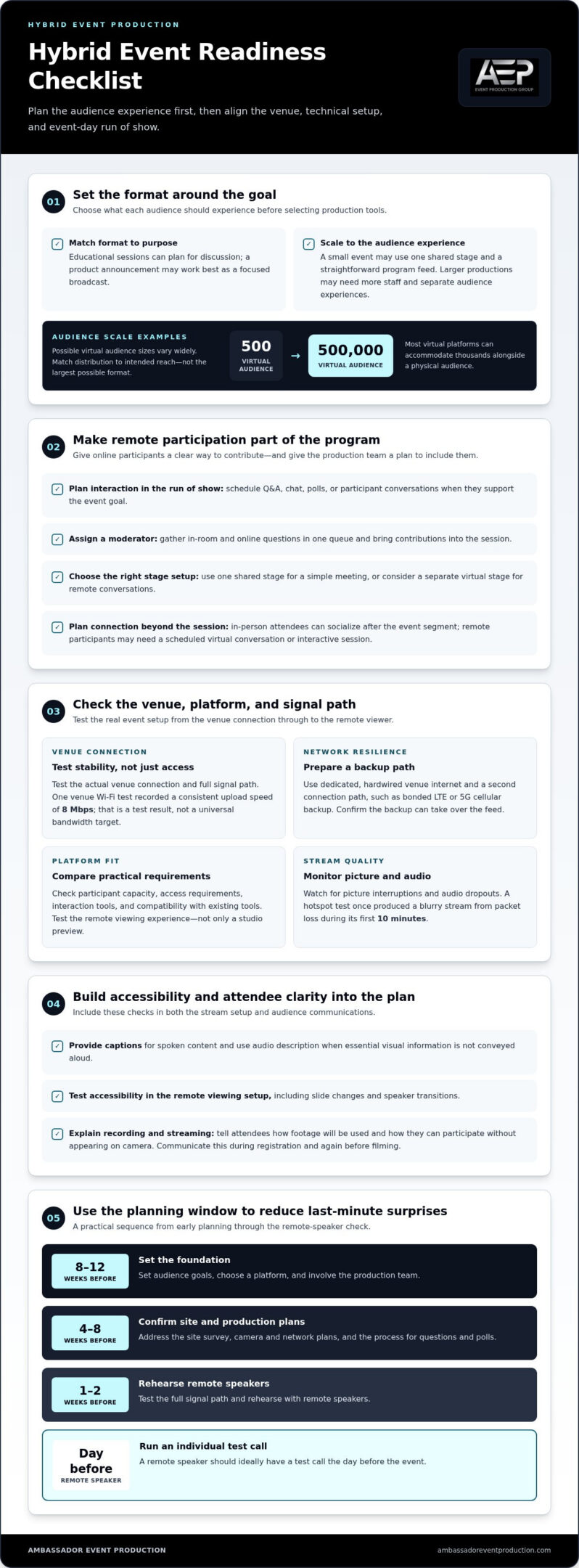
A small hybrid event may need only one shared stage and a straightforward program feed; a larger production may require more staff and separate audience experiences. Start with the desired outcome, then assess the venue, audiences, and distribution method before choosing the technical setup.
Hybrid Formats and Event Types
A hybrid event combines an on-site audience with remote participants through audiovisual recording, live streaming, and interactive tools. Conferences, educational sessions, and product announcements can all use this format, but each calls for a different balance of presentation and participation. Educational events often benefit from planned interaction, while a product announcement may work well as a focused broadcast without interactive segments.
Audience scale also shapes production. Examples of virtual audiences range from 500 to 500,000 people, while most virtual platforms can accommodate thousands alongside a physical audience. These figures describe possible event scales, not a reason to choose the largest format. Match the distribution plan to the intended reach and the experience you want online.
Interactivity and Event Goals
Begin with the outcome. If an educational event should encourage discussion, schedule questions, polls, or participant conversations. If the goal is a product announcement, a clear presentation may matter more than audience participation. Choose a production format that serves the purpose rather than adding tools that do not support it.
Plan how both audiences will take part. A moderator can gather in-room and online questions in one queue, while a separate virtual stage can support remote conversations. These decisions make online participation part of the program, not an afterthought.
The production approach depends on the event’s scale. A small meeting can bring both audiences together on one stage with a simple program flow. A mid-size event may need more considered camera coverage and a plan for handling audience questions. A large event with simultaneous, separate experiences calls for more staff and close coordination of audio and video. That coordination becomes especially important when parallel stages share one ballroom.
Begin planning eight to twelve weeks before the event by setting audience goals, choosing a platform, and involving the production team. Four to eight weeks out, address the site survey, camera and network plans, and the process for questions and polls. This sequence connects the format to the venue and distribution method before technical decisions become difficult to change.
Test internet connectivity and equipment as early as possible. During testing, a venue’s Wi-Fi connection recorded a consistent upload speed of 8 Mbps. Treat that as a test result, not a universal bandwidth target; streaming needs depend on the production and distribution plan. Test the actual venue connection and the full signal path, then rehearse remote speakers one to two weeks before the event. A remote speaker should ideally have a test call the day before.
Plan networking for both audiences. In-person attendees can socialize after the event segment, while remote participants may need a scheduled virtual conversation or interactive session. Using one online registration form or ticketing system for both groups can help organizers plan access and audience flow from the start.
What AV Equipment Works Best for Hybrid Events?
Choose equipment based on audience size, platform access, and the planned interaction. Reliable streaming also depends on testing the primary internet connection and providing a backup path.
Streaming Platforms and Feed Quality
Compare platforms by participant capacity, access requirements, interaction tools, and compatibility with the organization’s existing tools. Messaging, Q&A, and polling can support participation, while a presentation-focused broadcast may need fewer interactive features. Test the entire stream path, including venue connectivity and the remote viewer’s experience, rather than relying on a studio preview alone.
For a more reliable connection, use dedicated, hardwired venue internet and a second connection path, such as bonded LTE or 5G cellular backup. Monitor the live stream for picture interruptions and audio dropouts, and make sure the backup can take over the feed. A hotspot test the day before one conference produced a blurry stream from packet loss during its first 10 minutes, showing why a successful connection test should assess stability, not just access.
Build accessibility into the stream. Provide captions for spoken content, and use audio description when essential visual information is not conveyed aloud. Test captions and description in the remote viewing setup, including during slide changes and speaker transitions.
Before recording attendees, explain that the event will be streamed or recorded, how the footage will be used, and how participants can take part without appearing on camera. Make these details clear during registration and repeat them before filming begins. This helps attendees make an informed choice about participating.
Equipment and software costs depend on the setup and are provided after a quote request. The main cost factors include the platform, camera and audio requirements, network redundancy, production staffing, and the interaction features needed.
Interaction with Remote Viewers
Remote interaction works best when speakers can see questions and know when to respond. Build Q&A, chat, or polls into the run of show, and assign a moderator to bring contributions into the session. For an educational event, schedule discussion time; for a product announcement, keep the presentation focused if interaction does not serve its goal.
Prevent common stream problems by testing the platform and connection before the event, rehearsing remote speakers, and monitoring picture and sound throughout the broadcast. A standard hybrid stream can run 10 to 30 seconds behind the room; low-latency streaming can reduce the delay to a few seconds. Keep return audio from creating a feedback loop, and use audio-visual technical support to coordinate the production signal path.
How do you connect on-site and remote participants?
Use a control room to bring camera, presentation, and remote-speaker sources together, then test each signal through the platform and venue screens. Route audience questions to one moderated queue, and give remote speakers a return feed so they can hear the room and join the conversation.
Clean Feeds for Remote Guests
Build the broadcast from a dedicated program mix, not simply the sound coming through the venue PA. Send remote viewers a cleaner audio mix, routing local microphones to both the room and a separate streaming bus. This helps online listeners hear speakers clearly without the room’s amplified sound overpowering the feed.
In the video control room, combine camera views, presentation slides, and remote-speaker feeds into the program output. Send that output to the streaming platform and distribute the appropriate picture to venue screens. Keep return audio for remote speakers separate from the broadcast mix to reduce the risk of feedback loops.
Participant and Q&A Integration
Use one moderated queue for questions from in-person and online attendees. A moderator can collect virtual questions through the platform and combine them with questions from the room before passing them to speakers. This gives both groups a clear way into the discussion during a corporate presentation or webinar.
Remote speakers need more than a one-way broadcast. Provide a return feed so they can hear the host and audience, along with a clear talkback process for production cues. For a dedicated virtual experience, a separate backstage stage can host remote exercises and conversations. A separate MC can welcome online participants before the main-stage content begins.
Feed Setup and Platform Connections
Map every source to its destination before connecting devices. The production control room can send the program feed to the conferencing platform and a separate output to venue screens. Event apps can carry polls, chat, and Q&A alongside the video, allowing remote viewers to participate without disrupting the broadcast.
Test the complete chain using the actual platform, app, and screens. Check that slides are legible, microphones reach both audiences, and questions reach the moderator. Rehearse with remote speakers one to two weeks before the event, then hold a test call the day before. This can reveal connection and routing problems while there is still time to adjust.
During the event, have a host speak directly to remote viewers, introduce speakers, and explain how to submit questions. Without that connection, virtual attendees can feel detached from the room. For example, the host can acknowledge online questions during a panel while the moderator passes selected questions to the stage. Keep cues simple: tell remote speakers when they are live, when to respond, and when the program is moving on.
Finally, check synchronization across destinations. A standard stream can run 10 to 30 seconds behind the room, while low-latency streaming can reduce delay to a few seconds. Tell the host and moderator which audience is hearing each cue, and avoid relying on simultaneous reactions across screens and the room. Clear routing and defined roles keep remote participation connected to the event.
Streaming live video and managing multiple feeds
Plan a video feed and a suitable mix for each destination. Map the sources, outputs, and monitoring responsibilities before streaming begins.
Multi-Platform Streaming
For simultaneous streaming, route the program output to each selected platform through the production encoder or streaming workflow. Confirm that every destination receives the intended picture, audio, and presentation content. A meeting stream and a public broadcast may need different access settings, so decide on platform access before event day.
Monitor each destination separately during the event. One platform may show a clear picture while another has muted audio or a stalled feed. Assign a team member to check the viewer experience on each platform, and keep a fallback plan for directing attendees if a destination fails.
Keep source routing straightforward. Label camera, presentation, and remote-speaker inputs at the video switcher, then define which sources appear in each scene. For example, a panel scene can show the live stage, while a speaker scene brings a remote guest forward. A recorded version can use the same program feed if its audio and graphics suit later viewing.
Audio needs its own routing plan. Send each local microphone to the room’s PA and a separate streaming bus, using an aux or subgroup for the online mix. The stream should receive a cleaner mix than the one played in the venue. This lets the operator balance speech for remote viewers without changing the room’s sound levels.
Stream Delay and Low-Latency Delivery
A standard hybrid event stream often runs 10 to 30 seconds behind the room. Low-latency streaming can reduce that delay to a few seconds. Choose the delivery mode based on the program: a one-way presentation can accommodate more delay than a live Q&A that depends on quick responses.
Tell speakers and moderators which feed they are monitoring. If attendees in the room hear a question before online viewers do, the host should pause for the stream delay before moving on. This avoids cutting off remote responses and keeps the conversation clear for both groups.
During a full rehearsal, verify audio and video from source to destination, then check the stream as a viewer would. Confirm that a switched camera, presentation slide, and remote speaker each appear correctly. Monitor the room and online mixes independently, and record a short test so the team can review transitions before the live broadcast.
Cameras, microphones, speakers, switchers, and encoders
Choose cameras, microphones, speakers, and signal-processing equipment to suit the room and program. A single-presenter conference needs different coverage from a panel taking audience questions. The goal is to capture clear speech and useful pictures, then route each source to venue screens and the virtual event. A video switcher selects or combines camera and presentation feeds; an encoder prepares the program for streaming.
Position cameras according to what remote viewers need to see. A wide shot establishes the stage, while a closer shot helps viewers follow a speaker’s expression. For audience questions, include a camera view that can frame the person speaking. One meeting-room setup described for hybrid events uses four PTZ cameras for remotely controlled coverage. Presets can return cameras to planned views, such as a lectern, panel, or audience area.
Capture slides directly from the presenter’s laptop and send them to the vision mixer. Filming a projected screen can make text harder to read and introduce glare or keystone distortion. The operator can switch between the direct slide feed and the speaker camera, or show both together when the presentation calls for it. Check every slide through the stream, not only on the room’s projection screen.
Microphone choice and placement affect speech clarity. One described meeting-room setup uses ten Shure desk microphones, while a basic mixer plan includes two XLR inputs for a conference microphone and a wireless audience microphone. Route each local microphone to the PA and the stream mix. Keep the PA level as low as practical while maintaining clear sound in the room.
Confirm that the mixer can handle every source and destination. One proposed configuration includes an RCA-level input for audio from the Zoom session controller PC and an output to send the local microphone mix back to that computer. Keep return audio out of the wrong signal path to avoid feedback. Clear routing and cues help ensure a smooth handoff between an in-room speaker and a remote guest.
Before doors open, test every camera, microphone, slide feed, switcher input, and encoder output. Rehearse a camera change while a presenter advances slides, then check that both the venue screens and stream show the intended picture. This practical run-through exposes routing errors before attendees arrive. For help coordinating equipment and signal flow, plan your event’s AV technical support.
Ambassador Event Production: Video Production Services
Ambassador Event Production provides video production services for events that need coordinated on-site and remote video. Turn to the team when camera feeds, presentation content, and streaming outputs need to work together as one production. Audio-visual technical support can coordinate signal flow, while audio production services address the mix for audiences in the room and online.
For a hybrid conference, that can mean planning how speakers, slides, and audience questions appear in the live feed, alongside Lighting Design and Execution for clear stage visibility. The right setup depends on the event format, venue, and audience experience you’re building. Discuss your production needs with Ambassador Event Production, or visit the website.
Shape the Next Step for Your Hybrid Event
The strongest production plan starts with the experience you want people to have, not a list of equipment. Decide what remote attendees should see, hear, and contribute, then let those priorities guide production choices. A clear brief gives your team a shared point of reference as the event takes shape.
Integrating live video feeds for hybrid audiences brings creative decisions and technical execution together. Ambassador Event Production offers video production services, audio-visual technical support, and audio production services to support that work. The right combination depends on your event’s format, content, and audience needs.
As you move from ideas to a production plan, a conversation can help clarify the technical approach and how it supports your goals. Contact Ambassador Event Production to discuss your event. With a considered plan and coordinated execution, you can create a shared experience that feels intentional for everyone attending.
Frequently Asked Questions
What are some of the challenges of hosting a hybrid event?
The main challenges are coordinating two audience experiences and keeping every part of the production connected. Remote viewers may experience delays while in-room attendees hear the program live, so moderators need clear cues. Staff must also manage questions, speaker transitions, and technical signals at once. For example, a panel with a remote guest needs someone to coordinate the guest’s audio, on-screen appearance, and turn to speak.
What is the difference between a virtual and a hybrid event?
A virtual event takes place online; a hybrid event combines an in-person gathering with remote participation. That difference affects how the program serves attendees. A virtual product briefing might use one online presentation, while a hybrid company meeting also needs to serve people in the venue. Organizers should decide whether both audiences share one program or have separate activities, since that choice affects staffing and production complexity.
What equipment and software are needed to integrate live video feeds for hybrid audiences?
A typical setup includes cameras, microphones, a video switcher, an encoder, a streaming or conferencing platform, and a control position for managing sources. Add venue screens and speakers when the room needs local sound and pictures. The exact system depends on the event format. For example, a remote presenter needs a way to send video and audio into the production, plus a return connection to hear the host.
What are the best platforms for streaming live video to hybrid event audiences?
The right platform fits the audience size, access requirements, interaction needs, and the organization’s existing tools. Compare registration, moderated questions, chat, and polling options, then confirm that the platform supports the planned event flow. For a private corporate meeting, controlled access may be the priority; for a public presentation, easy viewer access may matter more.
How can hybrid events provide low-latency, synchronized video and audio for remote viewers?
Choose a low-latency streaming mode when quick audience responses matter, and keep audio and video routed through a coordinated production path. A standard hybrid stream often runs 10 to 30 seconds behind the room, while low-latency streaming can reduce the delay to a few seconds. Rehearse speaker cues against the remote feed so hosts don’t mistake a delayed response for silence.
What internet bandwidth and backup connectivity are needed for reliable live video streaming?
Use a dedicated, hardwired venue connection with a separate backup path, such as bonded LTE or 5G cellular service. Test the actual connection under event conditions and monitor stability, not just whether a speed test completes. One venue recorded a consistent upload speed of 8 Mbps during testing, but that is a test result, not a universal target. Stream needs depend on the production and distribution setup.