
Technical Support for Hybrid Events: 2026 Guide
The keynote is clear in the room, but remote attendees hear an echo and miss the audience Q&A. That gap can turn a polished program into two very different experiences. Effective technical support for hybrid events connects the room, production feed, and online platform so people can follow and participate wherever they’re watching.
It’s easy to focus on the stage, speakers, and schedule. But hybrid production also depends on audio, video, lighting, streaming, and room systems working together, with a clear response plan if something goes wrong. A disconnected signal or unclear handoff can interrupt presentations and leave remote participants behind.
This guide explains the technical roles and systems a hybrid event needs, how to reduce production risks through coordination, preparation, and rehearsal, and what to consider when choosing an integrated production partner. Aligning video, audio, lighting, staging, and rigging from the outset helps the technical team support one cohesive experience for both audiences, while your event team stays focused on delivering the program.
Key Takeaways
- Technical support for hybrid events coordinates the people and production systems serving both in-room and remote audiences.
- Trace how presenter audio and video reach the online audience, and plan a dedicated audio mix for remote viewers.
- Plan for remote attendees as well as the room, with camera coverage and screen composition that help viewers follow the program.
- Reduce show-day risks by confirming program needs, mapping signal paths, testing systems, rehearsing, and monitoring the production.
- A coordinated technical production team can align video, audio, lighting, staging, and rigging while the organizer retains ownership of the program.
What technical support for hybrid events actually covers
Technical support for hybrid events brings together the production crew, systems, and signal paths that serve people in the venue and people joining remotely. It connects the room’s sound and visuals with a broadcast feed and online delivery, so each audience can follow the same program in a format that works for them. For a foundational overview of the event format, see What is a Hybrid Event?
Hybrid event technical support coordinates people, production systems, and content delivery to create a connected experience for in-room and remote audiences.
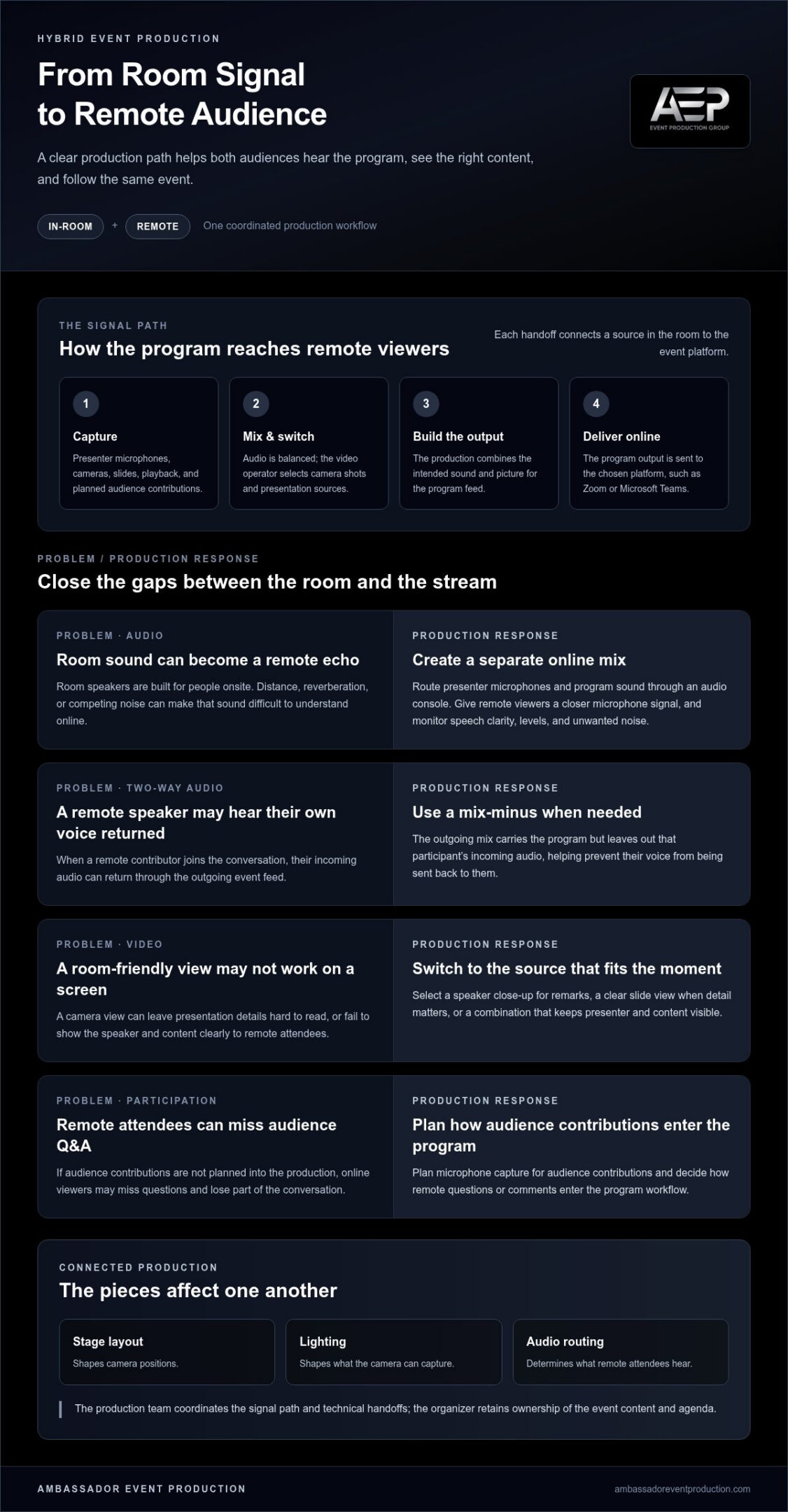
The work can include microphones and audio mixing, cameras and video switching, lighting, staging and rigging, connectivity, and delivery through an online meeting or event platform. These elements affect one another: camera positions depend on the stage layout, lighting shapes what the camera can capture, and audio routing determines what remote attendees hear. A production team plans how the pieces work together rather than treating them as separate equipment requests.
How hybrid production differs from a basic livestream
A basic livestream may send a camera’s view to online viewers. A hybrid event has a broader goal: support people in the room while making the program clear and engaging for remote participants. That means making deliberate decisions about which microphones feed the broadcast, what cameras show, how presentations appear on screen, and how remote questions or comments enter the program.
A camera feed alone can’t ensure intelligible speech or useful interaction. Room speakers are designed for people onsite, and their sound may not translate cleanly into the online mix. Remote attendees also need content framed for a screen, such as readable presentation slides and camera views that show the speaker. Technical production supports these needs; event planning, agenda design, and catering are separate parts of organizing the event.
Which technical roles and systems work together
Audio and video teams manage what audiences hear and see. Audio production routes presenter microphones and other program sound into a mix for the room and a separate feed for remote viewers. Camera operators capture speakers, the stage, or other relevant activity, while video switching selects and combines sources such as camera shots and presentation slides.
Lighting helps presenters and stage details read clearly on camera as well as in the venue. Staging and rigging support the physical environment for the program and its production equipment. A technical director coordinates cues and transitions between sources, presenters, and remote feeds. Together, the crew maps how a microphone signal and camera image travel through production to the audience platform.
Platforms such as Zoom or Microsoft Teams can carry a program to remote attendees, depending on the event setup. While live event production connects directly to these platforms, maintaining reliable company networks and cloud environments often relies on managed IT support from providers such as hjstechnology.co.uk. The technical workflow connects the production output to the chosen platform and accounts for how remote participants join or contribute. Clear coordination among the organizer, presenters, venue contacts, and production crew helps align technical decisions with the program, while the organizer retains ownership of the content and agenda.
How hybrid event audio and video move from the room to remote viewers
Remote attendees experience the event through signals captured, mixed, and delivered in sequence. A presenter’s microphone feeds an audio console, where the production team balances speech with playback and other program sound. Cameras and presentation sources feed a video switcher, which selects what appears in the program output. That combined production is then sent to the online platform for remote attendees.
Clean source audio and a controlled signal path help remote viewers hear the program clearly and see the intended content without distracting interruptions.
Designing clear audio for both audiences
Microphones capture presenters, panelists, and, when planned, audience contributions. The audio team sends an appropriate mix to the room’s sound system and creates a separate mix for the online audience. Room sound alone can be difficult to understand remotely because it may include distance, reverberation, and competing noise. A closer microphone signal gives the remote mix a clearer foundation.
For two-way participation, a mix-minus can help prevent a remote speaker from hearing their own voice returned through the event feed. In simple terms, the outgoing mix includes the program but leaves out that participant’s incoming audio. This is especially useful when remote contributors join a conversation through the platform. During the program, the crew monitors levels, speech clarity, and unwanted noise, adjusting the mix as speakers and sources change.
Routing video, content, and platform feeds
Video switching brings camera shots, presentation slides, playback, and remote contributors into one output. The operator selects the right source for each moment: a close view of a speaker for remarks, a clear slide view when detail matters, or a combination that keeps both presenter and content visible. Camera framing and slide readability are linked decisions. A shot that works for the room may not show enough detail on a remote attendee’s screen.
The selected program output then travels to the online platform, where remote viewers receive the event. If a remote participant is part of the program, their feed can be brought into the production workflow and shown alongside the in-room content. The exact path depends on the event setup, so test each source and transition together rather than checking cameras, slides, and platform delivery in isolation.
Connections matter, too. HDMI is commonly used to connect laptops and displays, while SDI is often used for video production signal paths where a secure connection and longer cable runs are useful. The right choice depends on the equipment and layout. For more detail on planning camera coverage and production workflow, explore this corporate event video production guide.
Reliable technical support for hybrid events depends on coordinating audio and video paths from source to audience. An integrated production team can align connections and cues as part of hybrid event technical production, helping the organizer keep attention on the program.
How integrated technical support improves the hybrid audience experience
A well-produced hybrid event considers what people can hear, see, access, and contribute from each setting. In-room attendees experience the stage directly, while remote attendees depend on the camera view, program audio, shared content, and online interaction tools. One setup rarely serves both audiences equally without intentional production choices.
Use each audience’s needs to guide the technical plan:
- Audibility: Room attendees need clear sound across the space; remote participants need speech that comes through distinctly on their devices.
- Visibility: People in the venue can look toward the stage, while viewers online need camera shots and screen content framed for their displays.
- Content access: Slides and other materials should be legible in the room and in the online presentation view.
- Interaction: Questions and contributions need a clear route into the program, whether they come from the venue or the platform.
Camera coverage can help remote attendees follow speaker changes, panel discussions, and demonstrations. Screen composition matters, too: a slide may need to fill the view when its details are important, while a presenter should remain visible when their delivery adds context. These choices support attention and participation, but they can’t guarantee how actively attendees will engage.
Keeping remote attendees included in the program
Plan how audience contributions will move between the room and the online platform. For example, decide how an in-room question will be heard by remote viewers and how a remote question will reach the speaker and people onsite. Agree on cues for opening Q&A, passing between presenters, and returning to the main program. Without clear cues, participants may not know when or how to contribute.
A host or moderator can invite questions, explain participation steps, and manage the conversation. The technical crew supports the process by managing relevant microphones, platform feeds, and production cues. Define these responsibilities before show time so the moderator can focus on people and content while the crew handles technical execution.
Coordinating audio, lighting, and staging for camera
Stage visibility should work for both the room and the camera. Lighting needs to make presenters easy to see without distracting from the event environment or making the stage appear harsh on screen. Stage layout affects sightlines: podiums, seating, screens, and presenter positions can obstruct a camera view or make a speaker difficult to follow. Reviewing these relationships in advance helps the production team coordinate camera positions with the room setup.
Audio contributes to the experience even when the image is strong. Consistent speech levels help remote viewers follow transitions and discussion, while a well-planned stage can support clear microphone use and comfortable presenter movement. For more detail on sound planning and production standards, see the high-fidelity event audio production guide.
Integrated technical support for hybrid events aligns these choices across the venue and remote feed. The goal is a production that gives both audiences a clear way to follow the program and take part.
How to prepare hybrid event technical support before show day
Show-day reliability starts with shared information and a clear preparation sequence. The organizer, presenters, venue contacts, and technical production team should align early on the program, room conditions, and remote audience experience. That gives the crew time to identify dependencies, test the production path, and resolve questions before they affect the live program.
A readiness sequence keeps preparation practical:
- Confirm program needs. Document the event format, audience mix, presenter locations, content sources, and interaction points. Note when slides, playback, remote speakers, or audience questions need to enter the program.
- Map signals and responsibilities. Trace how presenter microphones, cameras, presentation devices, and remote contributions reach the room and online platform. Identify who approves program changes and who communicates updates to the technical team.
- Test systems in the venue. Check relevant equipment and connections alongside the room layout, power, and connectivity. Consider how presenter positions, audience seating, cable paths, and access constraints affect the production design.
- Rehearse the complete workflow. Run through presenter transitions, presentation playback, platform access, and remote contributor checks using the planned signal path.
- Monitor and respond. During the event, monitor the production and communication channels. Make sure the team knows how to report an interruption and who coordinates decisions about a program change.
What to confirm during technical planning
Turn the program into information the production crew can act on. Share the run of show, presenter names and locations, content files, planned audience participation, and speaker order. Confirm where remote contributors will join from and how their audio and video will be used. Early alignment helps technical support for hybrid events account for both the event content and the venue’s practical conditions.
Clarify how late changes reach the crew, too. A revised slide deck, altered speaker order, or new remote guest can affect cues and signal routing. Agreeing on one approval and communication process helps prevent conflicting instructions during setup and live delivery.
What to test during rehearsal and contingency checks
Test with the people and materials expected in the program. Check presenter microphones and camera framing, play the actual presentation files, confirm platform access, and listen to the remote audio. Rehearse handoffs between speakers and practice bringing a remote question or contributor into the program. A rehearsal validates the complete production path, not just individual devices.
Before the event, agree on how the team will respond if connectivity drops, a source fails, or equipment interrupts the program. Define who identifies the issue, who communicates with the organizer, and what alternate source or next step is available within the planned setup. A clear escalation path helps the crew respond calmly without leaving presenters or attendees uncertain.
For coordinated preparation across audio, video, lighting, and staging, work with an integrated technical production team to plan and execute the event’s production needs.
What an integrated hybrid event technical partner handles
A hybrid event has connected technical needs, and each production choice can affect another. A coordinated technical partner brings video, audio, lighting, staging, and rigging into one production plan, then aligns the people and systems responsible for delivering it. This shared approach gives the organizer a coordinated technical team instead of a series of disconnected production handoffs.
The organizer remains responsible for the event’s purpose, agenda, speakers, and program decisions. The technical production team translates those requirements into an executable setup, coordinates the technical elements, and delivers the production during the event. If a presentation changes or a transition needs adjustment, clear roles let the organizer communicate the program decision while the crew handles its technical implications.
How integrated production reduces handoff friction
Without shared coordination, separate departments may make decisions that conflict. A camera position can affect a stage sightline; a lighting adjustment can change how a presenter appears on camera; an audio cue must align with the right program moment. A coordinated team considers these connections during setup and maintains communication as the show runs.
Defined responsibilities also make it easier to route updates. Crew members know who is managing a cue, who is monitoring a production element, and how a change should be communicated. Technical direction supports that broader coordination by keeping departments aligned with the run of show. Learn more about how live event technical direction connects production teams and cues.
What collaboration with Ambassador Event Production looks like
Collaboration starts with the event’s technical requirements: the program format, production elements, room setup, and how remote attendees will receive the event. The team then coordinates the production plan across video, audio, lighting, staging, and rigging, aligning the technical work with the organizer’s schedule and priorities. During execution, the production crew manages its technical responsibilities while the organizer directs the program.
Ambassador Event Production is a family-owned company founded in 1955. Its integrated production capabilities support professional events with coordinated technical execution, giving organizers a partner for the production work behind the scenes. The approach is practical and collaborative: understand the production requirements, coordinate the systems and crew, and support delivery without taking ownership of the event agenda.
For organizers assessing technical support for hybrid events, integration means more than bringing several departments together. It means planning how those departments work as one production team, with responsibilities and communication established around the program. That coordination helps the event team stay focused on its content and attendees.
Explore integrated technical event production with Ambassador Event Production to see how coordinated production can support your hybrid event.
Make your next hybrid event easier to deliver
As you shape your next program, bring technical decisions into the conversation early. A shared production plan gives your team time to clarify priorities, align responsibilities, and make thoughtful choices before show day. It also creates a stronger foundation for adapting when the program or its needs change.
The right technical partner works alongside your event team, translating its goals into a coordinated production approach while leaving program ownership where it belongs. That partnership can make technical support for hybrid events more manageable, so you can focus on your speakers, content, and attendees.
Ambassador Event Production provides integrated technical production for professional events. Explore integrated technical production for your next hybrid event and take the next step toward a well-supported program for everyone attending.
With a clear plan and a coordinated technical team behind it, your next hybrid event can bring both audiences together with confidence.
Frequently Asked Questions
What does technical support for a hybrid event include?
Technical support for a hybrid event includes the crew and production systems needed to deliver the program to people in the venue and online. The setup depends on the format: a panel with remote guests may need separate microphones, camera feeds, and a way to bring online speakers into the room. The technical team coordinates these elements, while the organizer remains responsible for the agenda, speakers, and event content.
How do you make sure remote attendees can hear speakers clearly?
Give each active speaker a suitable microphone and check the online audio feed separately from the room speakers. During sound checks, ask someone listening through the actual platform to confirm speech is clear and consistent. If a question comes from the audience, make sure it’s picked up by a microphone before the speaker responds. This helps remote attendees hear the question as well as the answer, rather than losing context.
Can a hybrid event use Zoom or Microsoft Teams?
Yes. A hybrid event can use Zoom, Microsoft Teams, or another suitable online platform. The production setup needs to send the program feed to the selected platform and account for how remote participants will join, speak, or share content. For example, a remote panelist may need a clear return view and audio path, while the in-room crew manages that person’s contribution as part of the live program.
What equipment is needed for technical support at a hybrid event?
Equipment varies with the room, program, and number of sources. A setup might include presenter microphones, a sound mixer, cameras, a video switcher, lighting, presentation playback, and a computer or encoder for the online feed. Displays and cabling connect parts of the system. Not every event needs every item; the technical plan should match the speakers, content, venue, and expected audience interaction.
Why is a rehearsal important for a hybrid event?
A rehearsal lets presenters and crew practice the real sequence, not just check that equipment powers on. For example, the team can test a slide change while a remote speaker joins, then confirm the right person and content appear and that sound reaches both audiences. Presenters also learn where to look and how to pause for questions. Finding unclear cues or access problems during rehearsal gives the team time to address them before the event.
Who manages the technical production during a hybrid event?
The technical production team manages the systems and cues that deliver the event, such as audio levels, camera shots, lighting changes, and transitions between content sources. A technical director or designated lead can coordinate those departments and communicate with the organizer. The organizer still owns the program, including agenda decisions and speaker priorities. Agreeing on who can authorize changes helps the crew act on updates without confusion during the event.
What happens if the internet connection or a technical system fails?
The team follows a contingency plan established for the event, with a clear process for reporting the interruption and deciding what happens next. Depending on the issue and planned setup, that could mean switching to an alternate source, pausing briefly, or informing attendees while the team works to restore the feed. Discuss likely failure points in advance, assign communication responsibilities, and avoid promising a fallback that hasn’t been tested.