
Solving Video Latency Issues in Hybrid Events: A Practical Guide
A few seconds of delay can make a hybrid event feel like two separate shows. Remote attendees may hear a punchline after the room has laughed or see a key moment well after it happens onstage. Solving video latency issues in hybrid events starts with finding where the delay enters the signal chain, not changing settings at random.
It’s understandable to want the stream to feel instant. But chasing zero delay can introduce synchronization problems or make playback less reliable. The practical goal is to reduce avoidable lag while keeping the in-room and remote experiences aligned and stable.
This guide follows the video path from camera capture and processing through transport and viewer playback, helping you narrow down the source of a delay. You’ll find a practical order for testing and prioritizing fixes, along with ways to coordinate video, audio, streaming, and technical teams around a shared timing plan. With a clear view of the whole system, troubleshooting becomes more focused and less disruptive.
Key Takeaways
- Separate camera-to-screen delay, audio-video sync errors, and remote-stream delay to identify what needs attention.
- Trace video and audio as parallel signal paths, checking each handoff from capture through display and playback.
- Compare delivery paths by relative delay, stability needs, infrastructure demands, and support for two-way interaction.
- When solving video latency issues in hybrid events, define the symptom, test endpoints, adjust one stage at a time, and retest before making further changes.
- Align video, audio, streaming, and display teams around one signal-flow plan and shared timing reference.
What Does Video Latency Mean in a Hybrid Event?
Latency is the elapsed time between an action and the moment its image or sound reaches a destination. The basic idea is simple: Latency is a time delay between cause and effect. In a hybrid event, however, “the delay” can describe different points in the audience experience. Start by identifying exactly what attendees see or hear.
Hybrid-event latency is the delay between an event action and its arrival as video or sound. It can appear as camera-to-screen lag, an audio-video sync error, or delay reaching remote viewers. Camera-to-screen delay occurs when an image takes time to travel from capture to a display. An audio-video sync error occurs when sound and picture arrive at different times, such as when speech is heard before the speaker’s lips move. Remote-viewer delay is the gap between an action onstage and its appearance or sound on a viewer’s device.
These forms can overlap, but they are not interchangeable. A remote stream might arrive several moments after the room display while remaining internally synchronized, meaning its audio and video match even though both are delayed. Another feed might arrive quickly but have a noticeable sound-picture mismatch. The distinction matters: reducing one type of delay won’t necessarily correct another, and an adjustment aimed at the wrong point can disrupt timing elsewhere.
Where does an audience notice delay?
Attendees notice lag when a slide changes after the presenter has started discussing it, a speaker’s reaction appears late on a screen, or a remote question reaches the room after the conversation has moved on. These moments can make participation feel disconnected. Visible lag is different from a sync error: in the first, the whole image arrives late; in the second, picture and accompanying sound don’t line up.
The room display and remote stream can follow separate routes. The in-room screen may receive a direct feed, while the remote audience sees video after it has passed through processing, a streaming platform, and playback. As a result, people in the room and online may see the same action at different times.
Why zero latency is not the useful target
Every stage can contribute some delay. The camera must capture an image; equipment may process or encode it; the signal travels through a network; then a platform, device, or display prepares it for playback. These steps serve practical purposes, including making the signal usable and delivery more dependable. Removing every buffer or process isn’t a realistic measure of success.
A more useful goal is predictable, manageable delay, with video and audio aligned and the room and remote experiences coherent. When solving video latency issues in hybrid events, locate where delay enters, then assess whether a change improves timing without compromising continuity. This keeps troubleshooting focused on the audience’s experience, not an unattainable promise of zero delay.
Trace Hybrid-Event Video Latency Through the Signal Chain
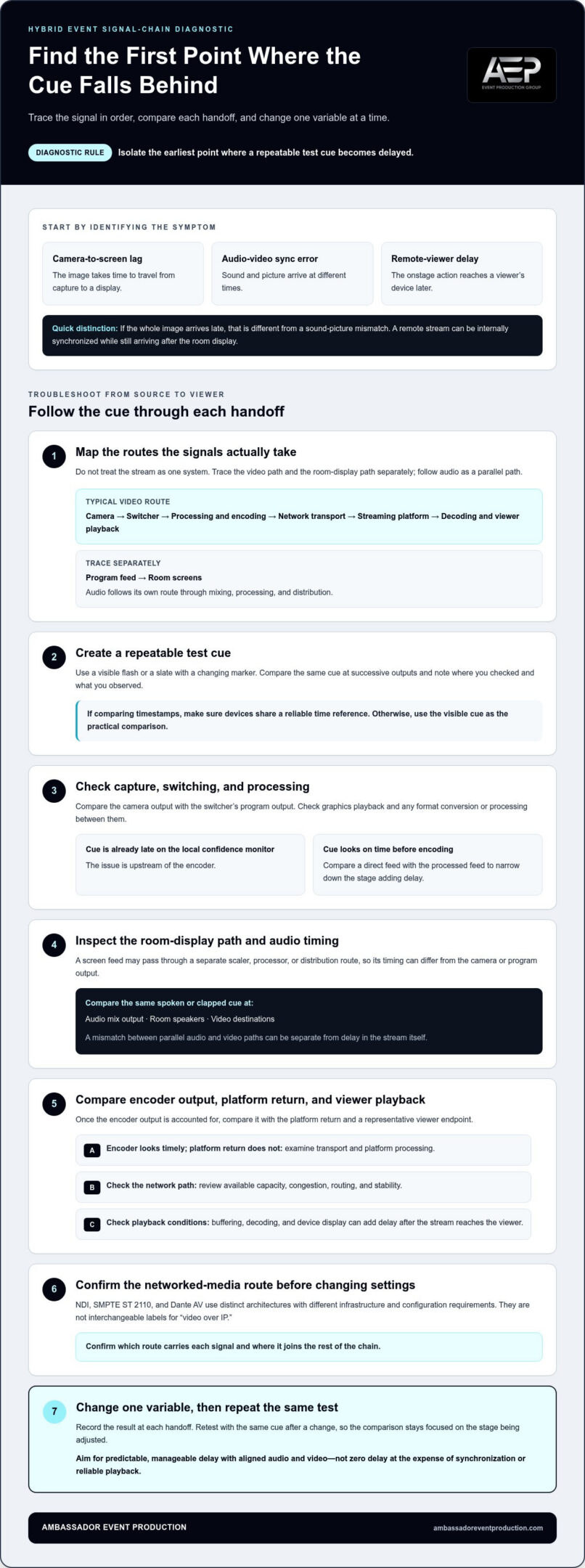
To find where delay begins, map the route a signal actually takes rather than treating the stream as one system. A typical video path runs from camera to switcher, through processing and encoding, across network transport to the streaming platform, then through decoding and playback on a viewer’s device. In parallel, a program feed may travel to room screens, while audio follows its own route through mixing, processing, and distribution.
Diagnostic rule: isolate the earliest point where a repeatable test cue becomes delayed. Use a visible cue, such as a flash or a slate with a changing marker, and compare it at successive outputs. Record where you checked and what you observed. If you compare timestamps, make sure the devices share a reliable time reference. Otherwise, a visible cue can provide a more practical comparison. Change one variable at a time, then repeat the same test.
Check capture, switching, and processing
Start at the source. Compare the camera output with the switcher’s program output, then check graphics playback and any format conversion or processing in between. Look at a local confidence monitor before stream encoding. If the cue is already late there, the issue is upstream of the encoder. If it appears on time, keep processing settings consistent and compare a direct feed with the processed feed to narrow down which stage adds delay.
Don’t overlook the room display path. A screen feed may pass through a separate scaler, processor, or distribution route, so its timing can differ from the camera or program output. Check audio alongside video: compare the same spoken or clapped cue at the audio mix output, room speakers, and video destinations. These are parallel paths, and a mismatch between them can be separate from delay in the stream itself.
Check network transport and viewer playback
Once you’ve accounted for the encoder output, compare it with the platform return and a representative viewer endpoint. If the encoder feed looks timely but the platform return does not, examine transport and platform processing. Review available network capacity, congestion, routing, and stability across the path. Then check playback conditions, since buffering, decoding, and device display can add delay after the stream reaches the viewer.
Assess networked media systems according to their design. NDI, SMPTE ST 2110, and Dante AV use distinct architectures and have different infrastructure and configuration requirements. They aren’t interchangeable labels for “video over IP.” Confirm which route carries each signal and where it joins the rest of the chain before changing settings.
This staged approach makes solving video latency issues in hybrid events more precise: follow the cue, identify the first point of change, and test a targeted adjustment before moving downstream. A coordinated audio-visual production team can align checks across video, audio, and display paths.
Compare Latency Trade-Offs Across Hybrid-Event Delivery Paths
There isn’t one delivery path that suits every part of a hybrid event. The room’s confidence display, a one-way stream, and a live remote discussion have different timing needs. Compare them by audience experience and operational demands, then test the complete setup. A protocol name alone can’t predict end-to-end performance: equipment, configuration, network conditions, processing, and playback all shape what viewers receive.
| Delivery path | Relative delay | Stability and infrastructure needs | Two-way participation |
|---|---|---|---|
| Local in-room display | Often the most direct route, though switching, scaling, and display processing can add delay. | Requires compatible signal routing and dependable display processing. A separate screen path may not match the program feed automatically. | Suitable for presenters and in-room participation, but it does not by itself connect remote attendees. |
| Platform-based streaming | Typically more delayed than a direct room feed because video passes through encoding, transport, platform processing, and viewer playback. | Depends on the full delivery chain, including network stability, platform behavior, and the viewer’s device. | Works well for one-way viewing; interaction may feel less immediate if responses travel through a delayed stream. |
| Interactive low-latency workflow | Designed to support more immediate exchange, but actual delay varies with the complete system. | Needs carefully coordinated capture, transport, playback, audio, and network paths. Testing under event conditions is essential. | Best suited to live conversation, remote questions, and participation that depends on timely responses. |
These are relative comparisons, not performance guarantees. WebRTC is a real-time communication technology often considered for interactive workflows; low-latency HLS and standard HLS are examples of streaming approaches with different delivery characteristics. None guarantees a particular result on its own. Choose based on the audience’s task, then verify timing from source to actual destination, including room screens and remote returns.
When should a team favor a simple delivery path?
For a one-way presentation, a straightforward path can mean fewer conversion points and fewer settings to coordinate. That can make diagnosis easier and support predictable playback, especially when remote viewers don’t need to interrupt or respond in real time. But a path that looks simple on paper still needs to be tested. Use the event’s actual cameras, switcher, displays, platform, and playback devices.
When does interactive participation change the requirements?
A live exchange depends on more than what the remote attendee sees. Their question must reach the room, and the response must return quickly enough to feel conversational. That round trip makes timing more noticeable than one-way viewing. A workflow using WebRTC may suit this need, but the result still depends on end-to-end design and testing. When solving video latency issues in hybrid events, select the path around the participation required, then check that room audio, stream video, and remote returns remain coherent together.
Use a Practical Workflow to Reduce Video Latency Before and During the Event
A repeatable process protects timing and reliability better than changing several settings under pressure. When solving video latency issues in hybrid events, agree on a shared reference point and compare the same cue across program video, room screens, audio, and remote returns. This gives video, audio, streaming, and technical teams a common way to describe what they see and hear.
Follow this sequence when a delay appears:
- Define the symptom. Identify what is late, where it appears, and whether audio and video are both affected.
- Map the path. Note each route from capture and switching through processing, transport, platform, and playback, including separate room-screen and audio paths.
- Test the endpoints. Compare a consistent visible and audible cue at the camera, program output, room display, audio destination, platform return, and representative viewer device.
- Adjust one stage. Choose a change based on where the cue first shifts. Avoid simultaneous changes that make the cause harder to identify.
- Retest and record. Repeat the same comparison, note the result, and keep the setting only if it improves timing without disrupting another destination.
A shared timing reference doesn’t require every audience to receive the signal at the same instant. It helps the team judge whether video and audio remain aligned at each destination and whether any difference between the room and remote feed is expected and manageable. For more on keeping picture and sound coordinated, see the principles of event video and audio synchronization.
Build a repeatable pre-event latency test
Run a visible and audible cue through the complete setup, then compare it at camera, program, room, and remote endpoints. Test with the intended stream quality, realistic content such as slides and speaker movement, and representative audience devices and access conditions. Record the route, relevant settings, observations, and the person responsible for each system. Include backup paths in the test so the team knows how they affect timing before they’re needed.
Repeat the test after meaningful system changes, including a different signal route or playback device. A result from one endpoint doesn’t establish that every screen, speaker, or remote return is aligned.
Respond to latency during the live event
First establish the scope: does the issue affect all remote viewers, one destination, or only one signal path? Follow the pre-agreed escalation order and change one stage at a time. Keep a backup communication and content plan ready, such as a presenter bridging a short adjustment or essential information being available through another approved event channel.
Clear roles make this response calmer. A technical lead can coordinate checks while video, audio, and streaming operators report observations against the same reference. A coordinated technical support approach keeps preflight checks and event-day troubleshooting connected.
Coordinate Video, Audio, and Technical Support for a More Reliable Hybrid Event
Latency troubleshooting works best when each operator understands how their part connects to the rest of the event. A camera or stream adjustment may affect room displays, audio timing, or the return feed. A production lead can keep teams aligned around one signal-flow plan, so people respond to the same evidence rather than making isolated changes.
That plan should reflect the run of show and audience needs. A speaker presentation, a remote question, and a video playback cue may use different routes and require different checks. Mapping those routes in advance helps the team understand which destinations could be affected by a change and who needs to verify the result.
Plan responsibilities across the technical team
Assign an owner for each part of the system: camera and switching, streaming, audio, room displays, and remote return feeds. Before show day, share the signal-flow diagram, communication channel, and escalation sequence. Clear ownership prevents a delay report from sitting between teams, while a shared plan helps operators distinguish a single-destination issue from a wider signal problem.
Connect technical decisions to the program. If remote audience questions are central to a session, confirm who monitors the return feed and how the moderator receives those questions. If slides and speaker video appear on room displays and in the stream, identify who checks each output. This coordination supports consistent timing without treating every destination as if it follows an identical path.
Turn diagnosis into a coordinated production plan
Use symptom maps and preflight observations to prioritize fixes. Start with the point where delay first appears, then consider how a proposed adjustment could affect other feeds. A production lead can coordinate the sequence, ask each owner to verify the relevant endpoint, and record what changed. This keeps troubleshooting measured and gives the team a useful reference if the same issue returns.
Ambassador Event Production brings video, audio, lighting, staging, and rigging together as integrated technical production for professional events. Founded in 1955 and family-owned and operated, the company supports technical production planning, monitoring, and troubleshooting across the signal path. For more context on how those elements work together, explore integrated technical event production. Teams preparing a corporate program can also review corporate event video production services.
Solving video latency issues in hybrid events is a shared production responsibility, from preflight through live monitoring. If you’re preparing an upcoming hybrid event, discuss your technical requirements with our team and bring the video, audio, streaming, and display needs into one coordinated plan.
Set Your Next Hybrid Event Up for Shared Timing
Make timing part of the technical brief from the start. Consider how remote and in-room guests will take part, what they need to see and hear, and where a noticeable delay could interrupt the experience. These choices help shape a production approach that serves the program, rather than forcing the program to adapt to technical decisions made at the last minute.
Early alignment gives your teams a clearer basis for planning and leaves room to make considered adjustments as the event takes shape. Solving video latency issues in hybrid events is ultimately about creating a connected experience for every audience, with technical choices that support the way people participate.
Ambassador Event Production provides integrated technical production for professional events, including video, audio, lighting, staging, and rigging. Plan a more coordinated hybrid event with our technical production team.
Frequently Asked Questions
Can video latency in a hybrid event be eliminated completely?
No. Capture, processing, signal transport, and playback all take time, so a literal zero-delay experience isn’t a practical expectation. Instead, set a timing goal based on what attendees need to do. A one-way presentation can tolerate a different delivery rhythm than a live question-and-answer session. Test the complete setup and focus on stable, synchronized playback rather than making a change that reduces delay but introduces interruptions.
What causes video latency during a hybrid event?
Latency can build at several points, including camera processing, format conversion, switching, encoding, network transport, platform handling, and playback. A graphics computer or display processor can also add delay on a separate route. For example, if a video clip appears late on the room screen but not in the camera feed, investigate the display route rather than changing the stream settings first. Pinpointing the affected destination helps narrow the search.
How do I test latency before a hybrid event?
Run a rehearsal using the actual cameras, presentation content, streaming platform, room displays, and representative viewer devices. Have someone trigger a visible cue, such as a slate change, alongside a clap or spoken marker. Compare what appears and sounds at each destination, and note which point first shows a difference. Repeat after meaningful setup changes so the team can distinguish a persistent issue from a one-off result.
Why is the livestream delayed compared with the room?
The in-room display may receive a direct program feed, while the stream passes through additional encoding, platform delivery, and player buffering before appearing on a viewer’s device. Those routes serve different destinations, so their timing can differ even when each feed is working as intended. Check whether the room and remote feeds are internally synchronized first, then decide if their timing difference affects the session format or audience interaction.
Does a low-latency protocol guarantee a delay-free event stream?
No. A low-latency protocol can support faster delivery, but it doesn’t remove delay from capture, processing, network conditions, platform behavior, or playback. The result depends on how the full system is configured and used. A workflow that performs well in a controlled test may behave differently with the event’s actual network and viewer devices. Choose a protocol to suit the audience’s needs, then rehearse the complete route.
How can I keep audio and video synchronized for remote viewers?
Check that the audio and video being sent to the stream come from coordinated points in the production system. Test a spoken cue or clap, then review the platform return on a viewer device rather than relying only on the production monitor. If speech looks out of sync, identify whether the mismatch is present in the program feed or appears later during delivery. Keep a record of adjustments and retest before applying them broadly.
What should the production team do if latency appears during a live event?
When solving video latency issues in hybrid events, first establish the scope: ask whether the problem affects all remote viewers, one device, or a room destination. The technical lead should coordinate reports from video, audio, streaming, and display operators, then authorize one targeted adjustment at a time. If testing takes a moment, use the agreed presenter or content fallback to maintain continuity. Confirm the result before making another change.